Deploying a Kubernetes-Based Media Server
How to deploy a full ARR stack — Jellyfin, Radarr, Sonarr, Prowlarr, and qBittorrent — on Kubernetes with NFS storage and Traefik ingress.
This stack runs fine in Docker Compose. I moved it to Kubernetes because everything else already was, and running one thing differently from everything else costs more than the migration did — volumes, health checks and restarts all behave the same way as the rest of the cluster.
Two storage classes underneath: app configs on Longhorn, media on a Synology DS223 exported over NFS 4.1 as a PersistentVolume. Configs are small and want replication; 400GB of media does not.
The stack
| Application | Role |
|---|---|
| Jellyfin | Media streaming |
| Radarr | Movie library management |
| Sonarr | TV show management |
| Prowlarr | Torrent indexer manager |
| qBittorrent | Download client |
| Gluetun | VPN sidecar for qBittorrent |
The NFS export
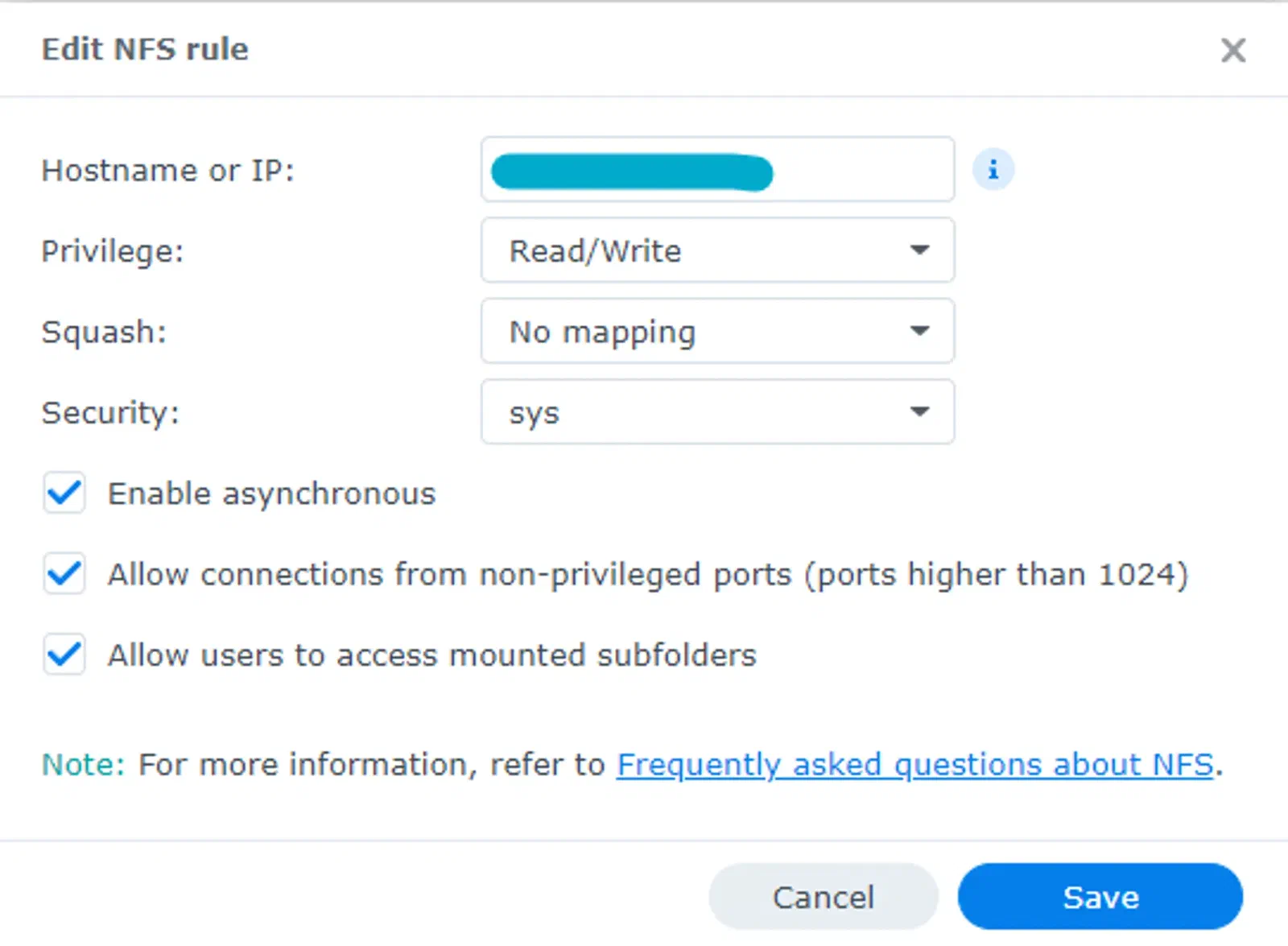
This has to exist before anything on the Kubernetes side tries to mount it. A PV pointing at an export that doesn’t permit the node stays Pending with no useful message. The Synology rule I use:
Media and download volumes
The library, mounted read-write by the *arr apps and read by Jellyfin — nfs-media-pv-and-pvc.yaml:
apiVersion: v1
kind: PersistentVolume
metadata:
  name: jellyfin-videos
spec:
  capacity:
    storage: 400Gi
  accessModes:
    - ReadWriteOnce
  nfs:
    path: /volume1/server/k3s/media
    server: storage.merox.cloud
  persistentVolumeReclaimPolicy: Retain
  mountOptions:
    - hard
    - nfsvers=4.1
  storageClassName: ""
---
apiVersion: v1
kind: PersistentVolumeClaim
metadata:
  name: jellyfin-videos
  namespace: media
spec:
  accessModes:
    - ReadWriteOnce
  resources:
    requests:
      storage: 400Gi
  volumeName: jellyfin-videos
  storageClassName: ""
kubectl apply -f nfs-media-pv-and-pvc.yamlAnd the download target, separate so an in-progress download is never inside the library — nfs-download-pv-and-pvc.yaml:
apiVersion: v1
kind: PersistentVolume
metadata:
  name: qbitt-download
spec:
  capacity:
    storage: 400Gi
  accessModes:
    - ReadWriteOnce
  nfs:
    path: /volume1/server/k3s/media/download
    server: storage.merox.cloud
  persistentVolumeReclaimPolicy: Retain
  mountOptions:
    - hard
    - nfsvers=4.1
  storageClassName: ""
---
apiVersion: v1
kind: PersistentVolumeClaim
metadata:
  name: qbitt-download
  namespace: media
spec:
  accessModes:
    - ReadWriteOnce
  resources:
    requests:
      storage: 400Gi
  volumeName: qbitt-download
  storageClassName: ""
kubectl apply -f nfs-download-pv-and-pvc.yamlConfig volumes on Longhorn
One per app, 5Gi each. These hold the databases the *arr apps refuse to rebuild — app-config-pvc.yaml:
apiVersion: v1
kind: PersistentVolumeClaim
metadata:
  name: app # radarr for example
  namespace: media
spec:
  accessModes:
    - ReadWriteOnce
  storageClassName: longhorn
  resources:
    requests:
      storage: 5Gi
kubectl apply -f app-config-pvc.yamlDeployments
Jellyfin
Create jellyfin-deployment.yaml:
apiVersion: apps/v1
kind: Deployment
metadata:
  name: jellyfin
  namespace: media
spec:
  replicas: 1
  selector:
    matchLabels:
      app: jellyfin
  template:
    metadata:
      labels:
        app: jellyfin
    spec:
      containers:
      - name: jellyfin
        image: jellyfin/jellyfin
        volumeMounts:
        - name: config
          mountPath: /config
        - name: videos
          mountPath: /data/videos
        ports:
        - containerPort: 8096
      volumes:
      - name: config
        persistentVolumeClaim:
          claimName: jellyfin-config
      - name: videos
        persistentVolumeClaim:
          claimName: jellyfin-videos
kubectl apply -f jellyfin-deployment.yamlSonarr
apiVersion: apps/v1
kind: Deployment
metadata:
  name: sonarr
  namespace: media
spec:
  replicas: 1
  selector:
    matchLabels:
      app: sonarr
  template:
    metadata:
      labels:
        app: sonarr
    spec:
      containers:
      - name: sonarr
        image: lscr.io/linuxserver/sonarr
        env:
        - name: PUID
          value: "1057"
        - name: PGID
          value: "1056"
        volumeMounts:
        - name: config
          mountPath: /config
        - name: videos
          mountPath: /tv
        - name: downloads
          mountPath: /downloads
        ports:
        - containerPort: 8989
      volumes:
      - name: config
        persistentVolumeClaim:
          claimName: sonarr-config
      - name: videos
        persistentVolumeClaim:
          claimName: jellyfin-videos
      - name: downloads
        persistentVolumeClaim:
          claimName: qbitt-download
Radarr
apiVersion: apps/v1
kind: Deployment
metadata:
  name: radarr
  namespace: media
spec:
  replicas: 1
  selector:
    matchLabels:
      app: radarr
  template:
    metadata:
      labels:
        app: radarr
    spec:
      containers:
      - name: radarr
        image: lscr.io/linuxserver/radarr
        env:
        - name: PUID
          value: "1057"
        - name: PGID
          value: "1056"
        volumeMounts:
        - name: config
          mountPath: /config
        - name: videos
          mountPath: /movies
        - name: downloads
          mountPath: /downloads
        ports:
        - containerPort: 7878
      volumes:
      - name: config
        persistentVolumeClaim:
          claimName: radarr-config
      - name: videos
        persistentVolumeClaim:
          claimName: jellyfin-videos
      - name: downloads
        persistentVolumeClaim:
          claimName: qbitt-download
Prowlarr
apiVersion: apps/v1
kind: Deployment
metadata:
  name: prowlarr
  namespace: media
spec:
  replicas: 1
  selector:
    matchLabels:
      app: prowlarr
  template:
    metadata:
      labels:
        app: prowlarr
    spec:
      containers:
      - name: prowlarr
        image: lscr.io/linuxserver/prowlarr
        env:
        - name: PUID
          value: "1057"
        - name: PGID
          value: "1056"
        volumeMounts:
        - name: config
          mountPath: /config
        ports:
        - containerPort: 9696
      volumes:
      - name: config
        persistentVolumeClaim:
          claimName: prowlarr-config
qBittorrent, no VPN
apiVersion: apps/v1
kind: Deployment
metadata:
  name: qbittorrent
  namespace: media
spec:
  replicas: 1
  selector:
    matchLabels:
      app: qbittorrent
  template:
    metadata:
      labels:
        app: qbittorrent
    spec:
      containers:
      - name: qbittorrent
        image: lscr.io/linuxserver/qbittorrent
        resources:
          limits:
            memory: "2Gi"
          requests:
            memory: "512Mi"
        env:
        - name: PUID
          value: "1057"
        - name: PGID
          value: "1056"
        volumeMounts:
        - name: config
          mountPath: /config
        - name: downloads
          mountPath: /downloads
        ports:
        - containerPort: 8080
      volumes:
      - name: config
        persistentVolumeClaim:
          claimName: qbitt-config
      - name: downloads
        persistentVolumeClaim:
          claimName: qbitt-download
qBittorrent behind Gluetun
Use this instead of the one above, not alongside it. Gluetun is a sidecar in the same pod, so it shares the network namespace — qBittorrent has no route to the internet except through the tunnel, which is the point. If Gluetun dies, qBittorrent loses connectivity rather than falling back to your real IP.
apiVersion: apps/v1
kind: Deployment
metadata:
  name: qbittorrent
  namespace: media
spec:
  replicas: 1
  selector:
    matchLabels:
      app: qbittorrent
  template:
    metadata:
      labels:
        app: qbittorrent
    spec:
      containers:
        - name: qbittorrent
          image: lscr.io/linuxserver/qbittorrent
          resources:
            limits:
              memory: "2Gi"
            requests:
              memory: "512Mi"
          env:
           - name: PUID
             value: "1057"
           - name: PGID
             value: "1056"
          volumeMounts:
            - name: config
              mountPath: /config
            - name: downloads
              mountPath: /downloads
          ports:
            - containerPort: 8080

        - name: gluetun
          image: ghcr.io/qdm12/gluetun:v3.40.0
          env:
            - name: VPN_SERVICE_PROVIDER
              value: "surfshark"
            - name: VPN_TYPE
              value: "wireguard"
            - name: SERVER_COUNTRIES
              value: "Netherlands"
            - name: WIREGUARD_ADDRESSES
              value: "10.14.0.2/16"  # from SurfShark WireGuard config — Address field
            - name: FIREWALL_INPUT_PORTS
              value: "50413,8080"  # torrent port + web UI port
            - name: FIREWALL_OUTBOUND_SUBNETS
              value: "10.0.0.0/8"
            - name: DNS_KEEP_NAMESERVER
              value: "on"
            - name: DOT
              value: "off"
            - name: WIREGUARD_PRIVATE_KEY
              valueFrom:
                secretKeyRef:
                  name: surfshark-secret
                  key: WIREGUARD_PRIVATE_KEY
          securityContext:
            capabilities:
              add:
                - NET_ADMIN
          volumeMounts:
            - name: tun
              mountPath: /dev/net/tun

      volumes:
        - name: config
          persistentVolumeClaim:
            claimName: qbitt-config
        - name: downloads
          persistentVolumeClaim:
            claimName: qbitt-download
        - name: tun
          hostPath:
path: /dev/net/tunServices and routing
Each app needs a ClusterIP service before Traefik has anything to route to. One per application, app-service.yaml — mind that targetPort differs per app while port stays 80:
apiVersion: v1
kind: Service
metadata:
  name: app # radarr for example
  namespace: media
spec:
  type: ClusterIP
  ports:
    - port: 80
      targetPort: 7878
  selector:
    app: app # radarr for example
kubectl apply -f app-service.yamlTraefik middleware
The security headers, applied once and referenced by every route — default-headers-media.yaml:
apiVersion: traefik.io/v1alpha1
kind: Middleware
metadata:
  name: default-headers-media
  namespace: media
spec:
  headers:
    browserXssFilter: true
    contentTypeNosniff: true
    forceSTSHeader: true
    stsIncludeSubdomains: true
    stsPreload: true
    stsSeconds: 15552000
    customFrameOptionsValue: SAMEORIGIN
    customRequestHeaders:
      X-Forwarded-Proto: https
kubectl apply -f default-headers-media.yamlIngressRoutes
Then one per application, app-ingress-route.yaml:
apiVersion: traefik.io/v1alpha1
kind: IngressRoute
metadata:
  name: app # radarr for example
  namespace: media
  annotations:
    kubernetes.io/ingress.class: traefik-external
spec:
  entryPoints:
    - websecure
  routes:
    - match: Host(`movies.merox.cloud`) # change to your domain
      kind: Rule
      services:
        - name: app # radarr for example
          port: 80
    - match: Host(`movies.merox.cloud`) # change to your domain
      kind: Rule
      services:
        - name: app # radarr for example
          port: 80
      middlewares:
        - name: default-headers-media
  tls:
    secretName: mycert-tls # change to your cert name
kubectl apply -f app-ingress-route.yamlManifests
All of them, ready to copy: media-stack manifests.
One thing to change if you build on this: the media PV is declared ReadWriteOnce while five deployments mount it. That works only as long as every pod lands on the same node, and it stops working the first time the scheduler disagrees. NFS is ReadWriteMany — declare it that way and the constraint disappears.