How to Set Up a K3S Cluster in 2025
Rebuilding my K3s cluster from scratch with Ansible — VM provisioning via Cloud-Init on Proxmox, HA across three nodes, and full automation.
My first Kubernetes clusters are gone. This time I want a proper HA setup — if any machine goes down, the cluster keeps running.
The target layout across my hardware:
- 1× DELL R720 →
k3s-master-1andk3s-worker-1 - 1× DELL Optiplex Micro 3050 →
k3s-master-2andk3s-worker-2 - 1× DELL Optiplex Micro 3050 →
k3s-master-3andk3s-worker-3
Six VMs total on a Proxmox cluster: 3 Ubuntu 24.04 master nodes, 3 Ubuntu 24.04 worker nodes.
DNS and addressing
Before creating any VMs, get your IP and DNS situation sorted.
For IP assignment, you have two options: assign addresses outside your DHCP range (what I do — network stays stable even if DHCP goes down), or use static MAC→IP mappings in your DHCP server.
I’m using 10.57.57.30/24 through 10.57.57.35/24 for the six VMs, with an A record in Unbound on pfSense for each:

Six VMs, from one script
Rather than clicking through the Proxmox UI six times, I wrote a bash script that handles template creation, VM deployment, and teardown. If you’d prefer a Packer/Terraform approach, see Homelab as Code.
Prerequisites: Proxmox up and running, SSH public key at /root/.ssh/id_rsa.pub on the Proxmox host.
The script has three modes:
Create the Cloud-Init template
Downloads the Ubuntu 24.04 cloud image, creates a VM from it, adds a cloud-init drive, and converts it to a template.
Deploy the VMs
Clones the template N times and sets IP, gateway, DNS, search domain, SSH key, CPU, RAM and disk size on each, asking for a name per VM.
Destroy the VMs
Stops and removes VMs by ID range.
#!/bin/bash

# Function to get user input with a default value
get_input() {
    local prompt=$1
    local default=$2
    local input
    read -p "$prompt [$default]: " input
    echo "${input:-$default}"
}

# Ask the user whether they want to create a template, deploy or destroy VMs
echo "Select an option:"
echo "1) Create Cloud-Init Template"
echo "2) Deploy VMs"
echo "3) Destroy VMs"
read -p "Enter your choice (1, 2, or 3): " ACTION

if [[ "$ACTION" != "1" && "$ACTION" != "2" && "$ACTION" != "3" ]]; then
    echo "Invalid choice. Please run the script again and select 1, 2, or 3."
    exit 1
fi

# === OPTION 1: CREATE CLOUD-INIT TEMPLATE ===
if [[ "$ACTION" == "1" ]]; then
    TEMPLATE_ID=$(get_input "Enter the template VM ID" "300")
    STORAGE=$(get_input "Enter the storage name" "local-lvm")
    TEMPLATE_NAME=$(get_input "Enter the template name" "ubuntu-cloud")
    IMG_URL="https://cloud-images.ubuntu.com/noble/current/noble-server-cloudimg-amd64.img"
    IMG_FILE="/root/noble-server-cloudimg-amd64.img"

    echo "Downloading Ubuntu Cloud image for cloud-init setup..."
    cd /root
    wget -O $IMG_FILE $IMG_URL || { echo "Failed to download the image"; exit 1; }

    echo "Creating VM $TEMPLATE_ID..."
    qm create $TEMPLATE_ID --memory 2048 --cores 2 --name $TEMPLATE_NAME --net0 virtio,bridge=vmbr0

    echo "Importing the image as the boot disk ($STORAGE)..."
    qm set $TEMPLATE_ID --scsihw virtio-scsi-pci \
        --scsi0 "$STORAGE:0,import-from=$IMG_FILE" || { echo "Failed to import disk"; exit 1; }

    echo "Adding Cloud-Init drive..."
    qm set $TEMPLATE_ID --ide2 $STORAGE:cloudinit

    echo "Configuring boot settings..."
    qm set $TEMPLATE_ID --boot order=scsi0

    echo "Adding serial console..."
    qm set $TEMPLATE_ID --serial0 socket --vga serial0

    echo "Converting VM to template..."
    qm template $TEMPLATE_ID

    echo "Cloud-Init Template created successfully!"
    exit 0
fi

# === OPTION 2: DEPLOY VMs ===
if [[ "$ACTION" == "2" ]]; then
    TEMPLATE_ID=$(get_input "Enter the template VM ID" "300")
    START_ID=$(get_input "Enter the starting VM ID" "301")
    NUM_VMS=$(get_input "Enter the number of VMs to deploy" "6")
    STORAGE=$(get_input "Enter the storage name" "dataz2")
    IP_PREFIX=$(get_input "Enter the IP prefix (e.g., 10.57.57.)" "10.57.57.")
    IP_START=$(get_input "Enter the starting IP last octet" "30")
    GATEWAY=$(get_input "Enter the gateway IP" "10.57.57.1")
    DNS_SERVERS=$(get_input "Enter the DNS servers (space-separated)" "8.8.8.8 1.1.1.1")
    DOMAIN_SEARCH=$(get_input "Enter the search domain" "merox.dev")
    DISK_SIZE=$(get_input "Enter the disk size (e.g., 100G)" "100G")
    RAM_SIZE=$(get_input "Enter the RAM size in MB" "16384")
    CPU_CORES=$(get_input "Enter the number of CPU cores" "4")
    CPU_SOCKETS=$(get_input "Enter the number of CPU sockets" "1")
    SSH_KEY_PATH=$(get_input "Enter the SSH public key file path" "/root/.ssh/id_rsa.pub")

    if [[ ! -f "$SSH_KEY_PATH" ]]; then
        echo "Error: SSH key file not found at $SSH_KEY_PATH"
        exit 1
    fi

    for i in $(seq 0 $((NUM_VMS - 1))); do
        VM_ID=$((START_ID + i))
        IP="$IP_PREFIX$((IP_START + i))/24"
        VM_NAME=$(get_input "Enter the name for VM $VM_ID" "ubuntu-vm-$((i+1))")

        echo "Creating VM: $VM_ID (Name: $VM_NAME, IP: $IP)"

        if qm status $VM_ID &>/dev/null; then
            echo "VM $VM_ID already exists, removing..."
            qm stop $VM_ID &>/dev/null
            qm destroy $VM_ID
        fi

        if ! qm clone $TEMPLATE_ID $VM_ID --full --name $VM_NAME --storage $STORAGE; then
            echo "Failed to clone VM $VM_ID, skipping..."
            continue
        fi

        qm set $VM_ID --memory $RAM_SIZE \
                      --cores $CPU_CORES \
                      --sockets $CPU_SOCKETS \
                      --cpu host \
                      --serial0 socket \
                      --vga serial0 \
                      --ipconfig0 ip=$IP,gw=$GATEWAY \
                      --nameserver "$DNS_SERVERS" \
                      --searchdomain "$DOMAIN_SEARCH" \
                      --sshkey "$SSH_KEY_PATH"

        qm set $VM_ID --delete ide2 || true
        qm set $VM_ID --ide2 $STORAGE:cloudinit,media=cdrom
        qm cloudinit update $VM_ID

        echo "Resizing disk to $DISK_SIZE..."
        qm resize $VM_ID scsi0 +$DISK_SIZE

        qm start $VM_ID
        echo "VM $VM_ID ($VM_NAME) created and started!"
    done
    exit 0
fi

# === OPTION 3: DESTROY VMs ===
if [[ "$ACTION" == "3" ]]; then
    START_ID=$(get_input "Enter the starting VM ID to delete" "301")
    NUM_VMS=$(get_input "Enter the number of VMs to delete" "6")

    echo "Destroying VMs from $START_ID to $((START_ID + NUM_VMS - 1))..."
    for i in $(seq 0 $((NUM_VMS - 1))); do
        VM_ID=$((START_ID + i))

        if qm status $VM_ID &>/dev/null; then
            echo "Stopping and destroying VM $VM_ID..."
            qm stop $VM_ID &>/dev/null
            qm destroy $VM_ID
        else
            echo "VM $VM_ID does not exist. Skipping..."
        fi
    done
    echo "Specified VMs have been destroyed."
    exit 0
fi
After running option 2, verify the VMs appear in Proxmox and SSH in:
ssh ubuntu@10.57.57.30Installing K3s
A fork of TechnoTim’s k3s-ansible does the whole cluster. Ansible goes on your machine, not on the nodes:
sudo apt update && sudo apt install -y ansiblebrew install ansiblegit clone https://github.com/meroxdotdev/k3s-ansible
cd k3s-ansible
cp ansible.example.cfg ansible.cfg
ansible-galaxy install -r ./collections/requirements.yml
cp -R inventory/sample inventory/my-clusterTwo files to edit. hosts.ini is just the addresses:
[master]
10.57.57.30
10.57.57.31
10.57.57.32

[node]
10.57.57.33
10.57.57.34
10.57.57.35

[k3s_cluster:children]
master
node
group_vars/all.yml is where the decisions are:
| Field | Value | Why |
|---|---|---|
ansible_user | ubuntu | The cloud image’s default user |
system_timezone | e.g. Europe/Bucharest | Log timestamps you can read |
calico_iface | "eth0" | Comment out flannel_iface and use Calico — Flannel works, but has no NetworkPolicy support |
apiserver_endpoint | 10.57.57.100 | A free LAN address. This is the control-plane VIP, and it must not be assigned to anything |
k3s_token | any alphanumeric string | — |
metal_lb_ip_range | 10.57.57.80-10.57.57.90 | A LAN range outside DHCP and unused. Every LoadBalancer service comes from here |
Both address ranges have to be free of your DHCP pool. A VIP that DHCP later hands to a laptop takes the control plane with it.
ansible-playbook ./site.yml -i ./inventory/my-cluster/hosts.iniOnce done, pull the kubeconfig and verify:
mkdir -p ~/.kube
scp ubuntu@10.57.57.30:~/.kube/config ~/.kube/config
kubectl get nodes
Traefik and certificates
Ingress and Let’s Encrypt, over Cloudflare’s DNS challenge — which means no port ever has to be open for a certificate to renew.
Helm first:
curl -fsSL -o get_helm.sh https://raw.githubusercontent.com/helm/helm/main/scripts/get-helm-3
chmod 700 get_helm.sh
./get_helm.sh
kubectl create namespace traefik
helm repo add traefik https://traefik.github.io/charts
helm repo update
git clone https://github.com/techno-tim/launchpadIn launchpad/kubernetes/traefik-cert-manager/, open values.yaml and set the LoadBalancer IP to something from your MetalLB range, then install:
helm install --namespace=traefik traefik traefik/traefik --values=values.yamlVerify:
kubectl get svc --all-namespaces -o wideExpected output:
NAMESPACE          NAME                              TYPE           CLUSTER-IP      EXTERNAL-IP   PORT(S)                                    AGE     SELECTOR
calico-system      calico-typha                      ClusterIP      10.43.80.131    <none>        5473/TCP                                   2d20h   k8s-app=calico-typha
traefik            traefik                           LoadBalancer   10.43.185.67    10.57.57.80   80:32195/TCP,443:31598/TCP,443:31598/UDP   53s     app.kubernetes.io/instance=traefik,app.kubernetes.io/name=traefik
Apply middleware:
kubectl apply -f default-headers.yaml
kubectl get middleware
Expected output:
NAME              AGE
default-headers   4s
The dashboard
Generate the credential line:
sudo apt-get install apache2-utils
htpasswd -nb merox password
Paste it into dashboard/secret-dashboard.yaml as is — stringData takes plain text and Kubernetes does the base64:
---
apiVersion: v1
kind: Secret
metadata:
  name: traefik-dashboard-auth
  namespace: traefik
type: Opaque
stringData:
  users: 'merox:$apr1$...'
Point your DNS server to the MetalLB IP from values.yaml:

Set your domain in dashboard/ingress.yaml:
routes:
  - match: Host(`traefik.k3s.your.domain`)
Apply everything from the traefik/dashboard folder:
kubectl apply -f secret-dashboard.yaml
kubectl get secrets --namespace traefik
kubectl apply -f middleware.yaml
kubectl apply -f ingress.yaml
The dashboard will be up but using a self-signed cert. The next section fixes that.
cert-manager
From traefik-cert-manager/cert-manager:
helm repo add jetstack https://charts.jetstack.io
helm repo update
kubectl create namespace cert-managerkubectl apply -f https://github.com/cert-manager/cert-manager/releases/download/v1.17.0/cert-manager.crds.yaml
helm install cert-manager jetstack/cert-manager --namespace cert-manager --values=values.yaml --version v1.17.0Apply your Cloudflare API secret (use an API Token, not a global key):
kubectl apply -f issuers/secret-cf-token.yamlBefore applying the remaining files, edit:
issuers/letsencrypt-production.yaml:email,dnsZonescertificates/production/your-domain-com.yaml:name,secretName,commonName,dnsNames
kubectl apply -f issuers/letsencrypt-production.yaml
kubectl apply -f certificates/production/your-domain-com.yaml
Monitor progress:
kubectl logs -n cert-manager -f deploy/cert-manager
kubectl get challenges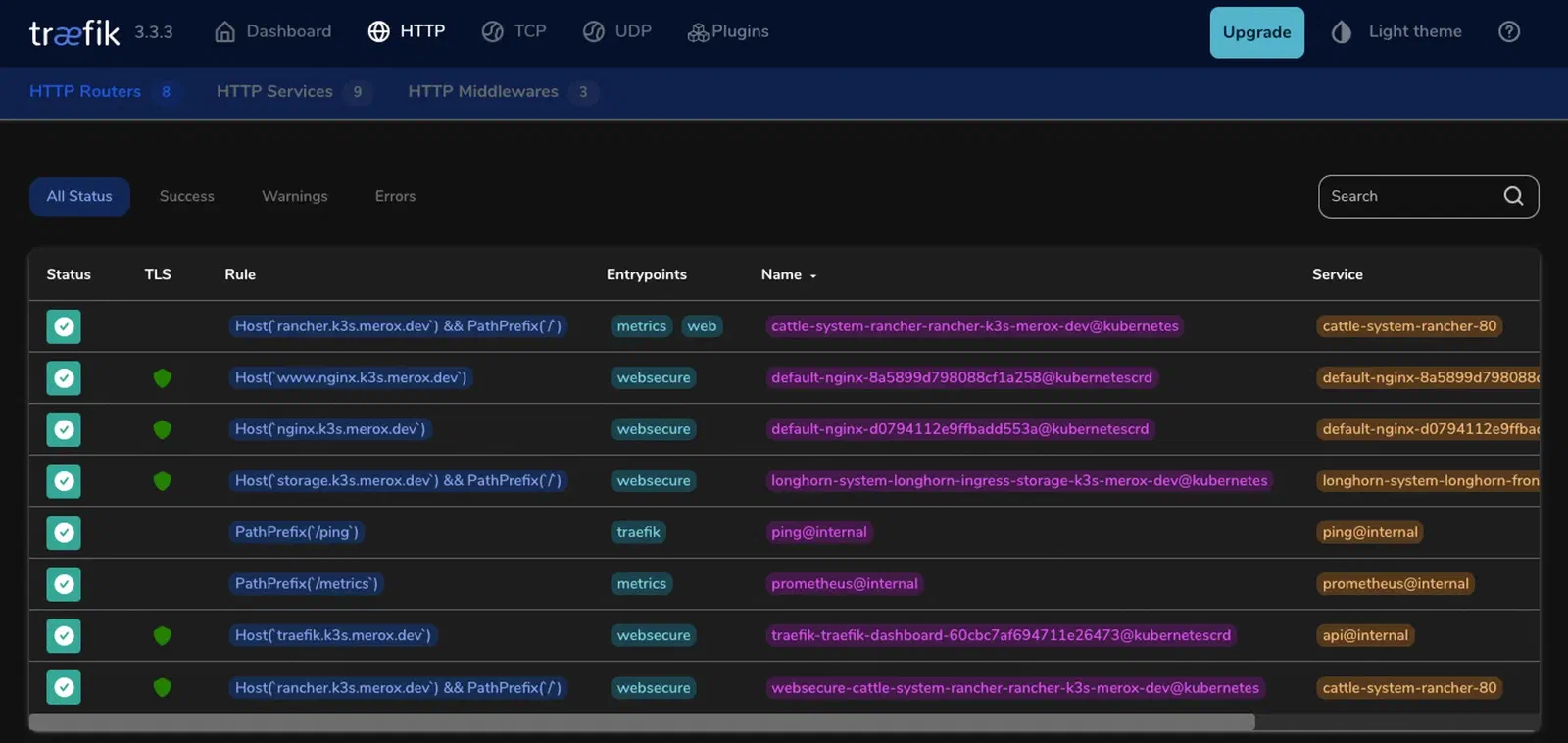
Rancher and Longhorn
A UI for the cluster, and somewhere for volumes to live.
Rancher
helm repo add rancher-stable https://releases.rancher.com/server-charts/stable
kubectl create namespace cattle-system
Traefik is already handling ingress, so set tls=external:
helm install rancher rancher-stable/rancher \
  --namespace cattle-system \
  --set hostname=rancher.k3s.your.domain \
  --set tls=external \
  --set replicas=3
Create ingress.yml:
apiVersion: traefik.io/v1alpha1
kind: IngressRoute
metadata:
  name: rancher
  namespace: cattle-system
spec:
  entryPoints:
    - websecure
  routes:
    - match: Host(`rancher.k3s.your.domain`)
      kind: Rule
      services:
        - name: rancher
          port: 443
      middlewares:
        - name: default-headers
  tls:
    secretName: k3s-your-domain-tls
kubectl apply -f ingress.yml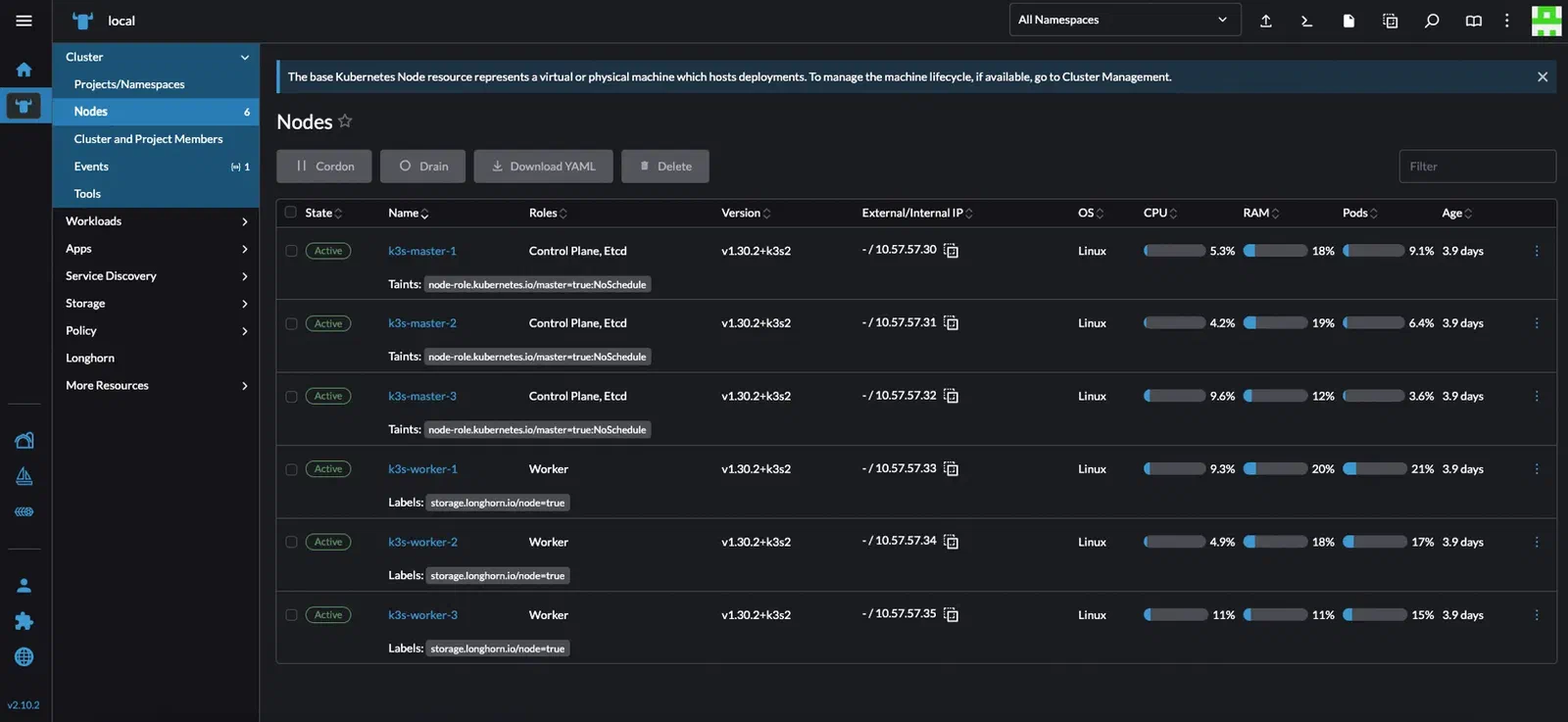
Longhorn
Install prerequisites on the nodes you want to use for storage:
sudo apt update && sudo apt install -y open-iscsi nfs-common
sudo systemctl enable --now iscsid
Label your three worker nodes for HA:
kubectl label node k3s-worker-1 storage.longhorn.io/node=true
kubectl label node k3s-worker-2 storage.longhorn.io/node=true
kubectl label node k3s-worker-3 storage.longhorn.io/node=true
Deploy (this manifest is patched to use the storage.longhorn.io/node=true label):
kubectl apply -f https://raw.githubusercontent.com/meroxdotdev/merox.docs/refs/heads/master/K3S/cluster-deployment/longhorn.yamlVerify:
kubectl get pods --namespace longhorn-system --watch
kubectl get nodes
kubectl get svc -n longhorn-system
Exposing Longhorn via Traefik
Create middleware.yml:
apiVersion: traefik.io/v1alpha1
kind: Middleware
metadata:
  name: longhorn-headers
  namespace: longhorn-system
spec:
  headers:
    customRequestHeaders:
      X-Forwarded-Proto: "https"
Create ingress.yml:
apiVersion: networking.k8s.io/v1
kind: Ingress
metadata:
  name: longhorn-ingress
  namespace: longhorn-system
  annotations:
    traefik.ingress.kubernetes.io/router.entrypoints: websecure
    traefik.ingress.kubernetes.io/router.tls: "true"
    traefik.ingress.kubernetes.io/router.middlewares: longhorn-system-longhorn-headers@kubernetescrd
spec:
  rules:
  - host: storage.k3s.your.domain
    http:
      paths:
      - path: /
        pathType: Prefix
        backend:
          service:
            name: longhorn-frontend
            port:
              number: 80
  tls:
  - hosts:
    - storage.k3s.your.domain
    secretName: k3s-your-domain-tls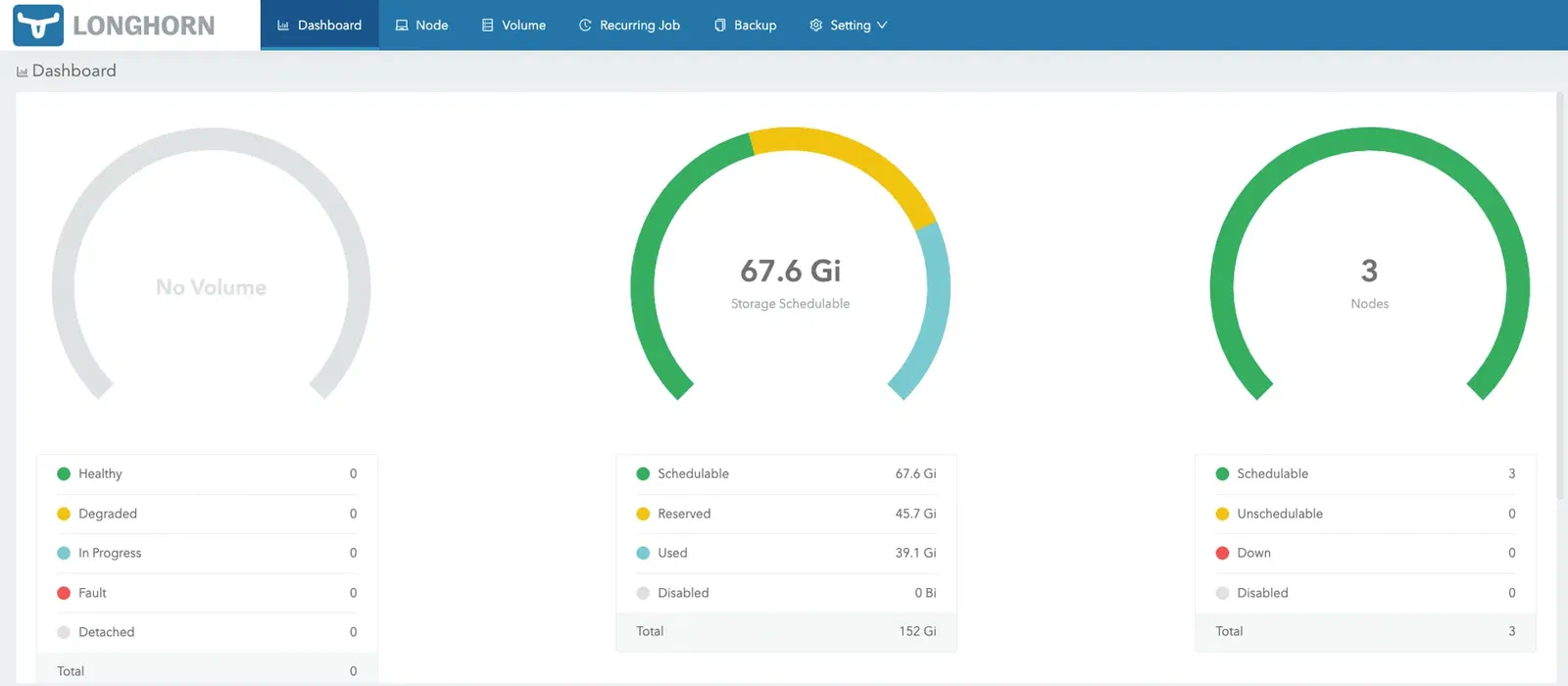
Where to go next
- NFS storage — the manifests, for anything too big to live on Longhorn
- Monitoring — Netdata is what I use. Prometheus and Grafana are a click away in Rancher, but untuned Prometheus will eat this cluster alive on query volume
- Continuous deployment — ArgoCD
- Upgrades — how to upgrade K3s
I wrote this because when I built my first K3s cluster a year earlier, there was no single page that covered all of it — every guide stopped at kubectl get nodes and left ingress, certificates and storage to somebody else.
Shoutout to TechnoTim and James Turland, whose repos most of this is built on.