Homelab as Code: Packer + Terraform + Ansible
Automate your homelab from scratch — VM templating with Packer, provisioning with Terraform, and service deployment with Ansible on Proxmox.
One command, and a Proxmox host goes from empty to a running VM with Docker, Portainer, Traefik and a media stack on it. Packer builds the template, Terraform provisions from it, Ansible configures what’s inside.
The interesting part isn’t any one of those tools. It’s that the handoffs between them are also code — Terraform writes the Ansible inventory itself, so there’s no step where you copy an IP address from one window into another.
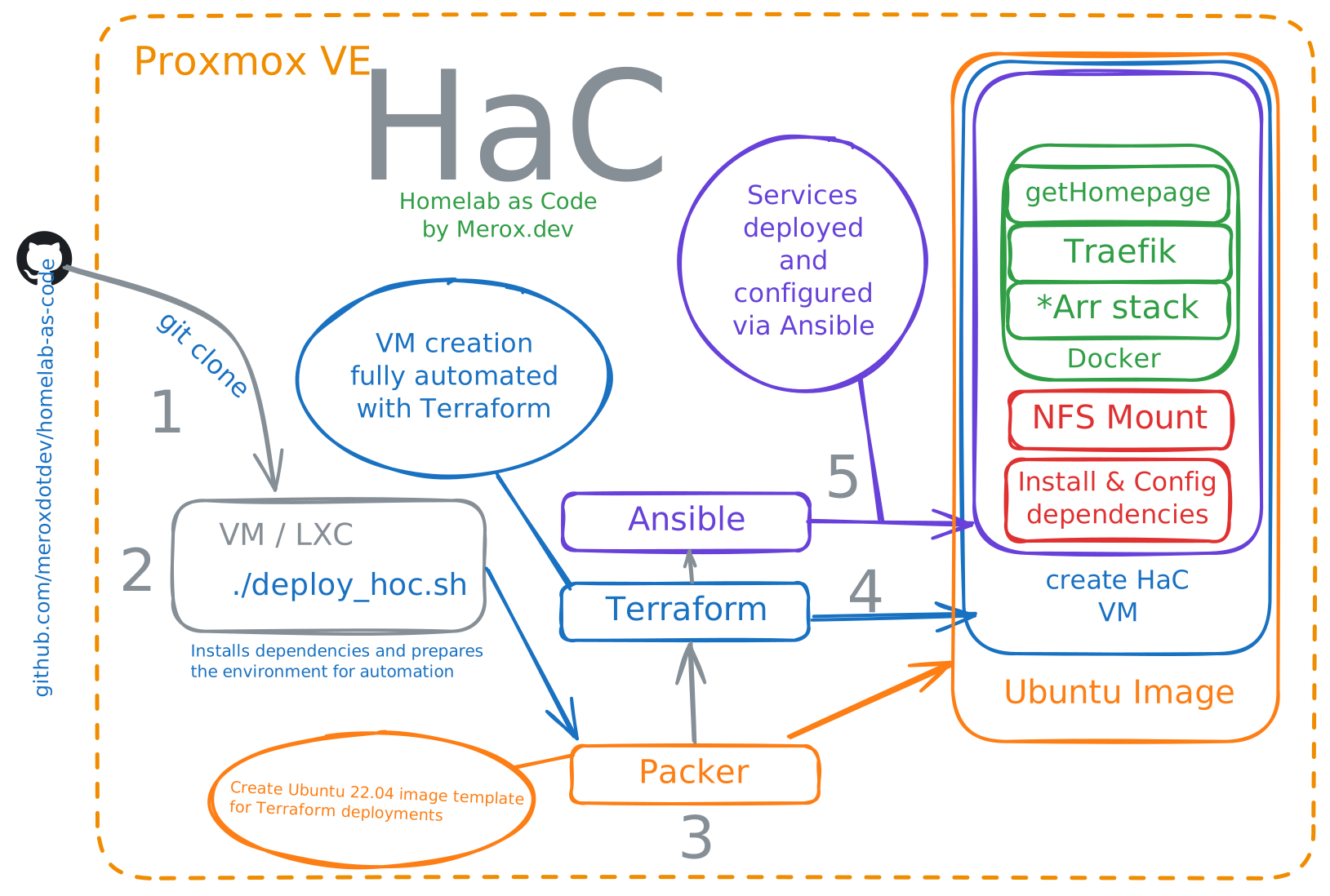
Source: meroxdotdev/homelab-as-code
What you’ll need
- Proxmox VE, with an API token
- A fresh LXC to run the deploy script from — it installs packages, so don’t use one you care about
- A DNS server for the service hostnames (Pi-hole, Unbound, Technitium — whatever you already run)
| Directory | What it does |
|---|---|
packer/ | Builds an Ubuntu template on Proxmox |
terraform/ | Provisions the VM from that template, networking and storage included |
ansible/ | Docker, Portainer, Traefik, optional NFS mounts |
configs/docker/ | The service stacks themselves — Homepage, Traefik, media |
Running it
On a clean LXC:
bash -c "$(curl -fsSL https://raw.githubusercontent.com/meroxdotdev/homelab-as-code/refs/heads/master/deploy_homelab.sh)"It asks two questions before doing anything. First, whether your repo is public or private — for a private one it generates an SSH key and waits while you add it as a deploy key. For the public tutorial repo, https://github.com/meroxdotdev/homelab-as-code.git works as-is.
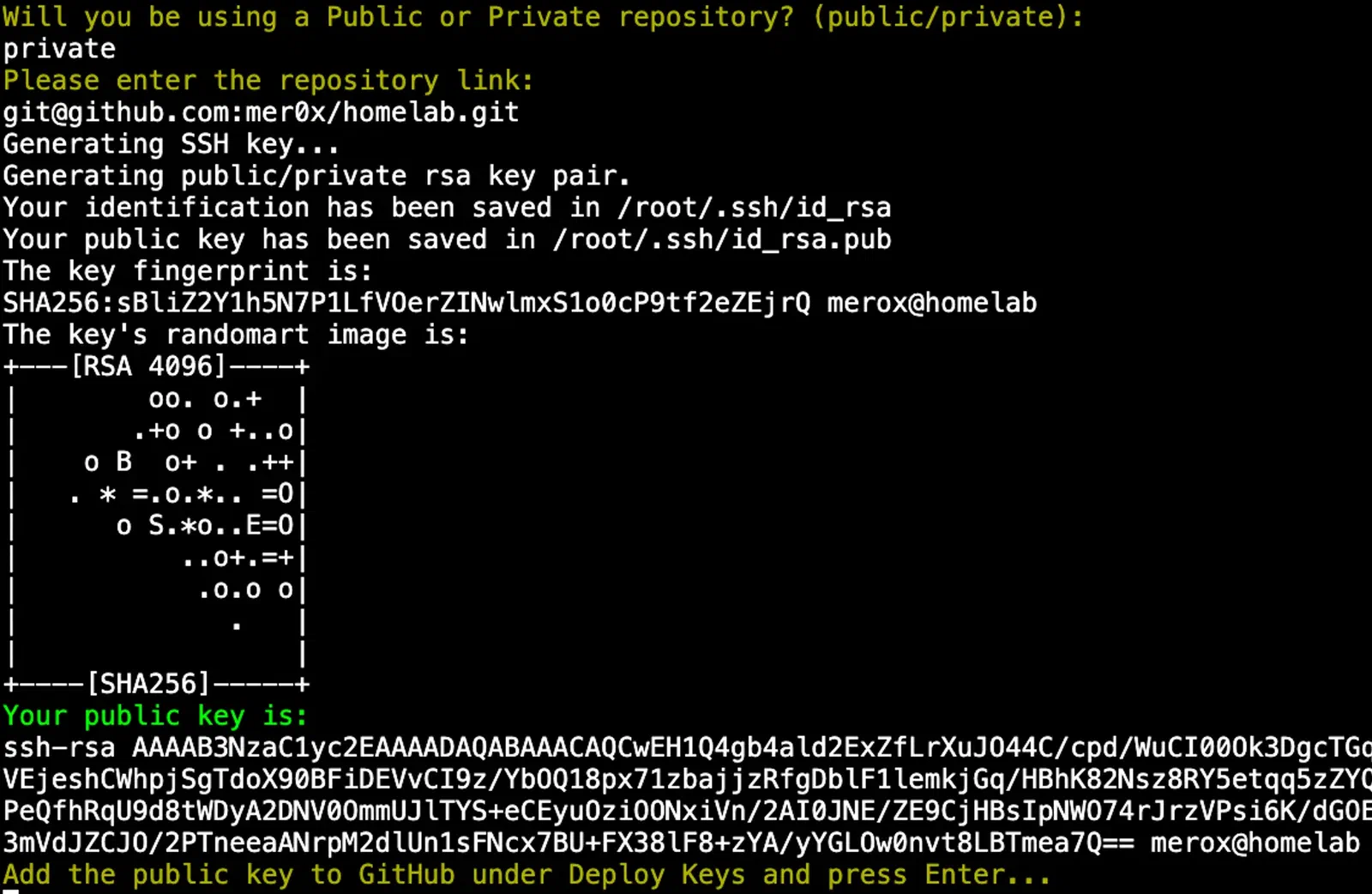

Second, whether you’ve already edited the config files. Answer no and it exits so you can do that — everything below is what it’s asking about. Config files land in /home/homelab/.
Packer
credentials.pkr.hcl holds the Proxmox API token. It does not go in a public repository:
proxmox_api_url          = "https://your-proxmox-ip-or-fqdn/api2/json"
proxmox_api_token_id     = "terraform_user@pam!homelab"
proxmox_api_token_secret = "your-proxmox-api-token-secret"
Generating the token is this part of Christian Lempa’s video; his boilerplates repo has more Packer examples than mine does.
The plugin block:
packer {
  required_plugins {
    proxmox-iso = {
      version = ">= 1.0.0"
      source  = "github.com/hashicorp/proxmox"
    }
  }
}
Then two placeholders in the template definition — YOUR_PROXMOX_NODE_NAME, and YOUR_IP_DEPLOYMENT_MACHINE for the machine running the script — and YOUR_SSH_KEY in the cloud-init user data, which is the key homelab_deploy.sh generated for you.
Terraform
Same credentials, plus host-level access for the provider:
proxmox_api_url          = "https://your-proxmox-ip-or-fqdn/api2/json"
proxmox_api_token_id     = "terraform_user@pam!homelab"
proxmox_api_token_secret = "your-proxmox-api-token-secret"
proxmox_host             = "proxmox-host-ip"
proxmox_user             = "proxmox-user"
proxmox_password         = "proxmox-password"
In the VM module, replace YOUR_PROXMOX_NODE_NAME, IP_MACHINE (the VM’s address), GateWay_IP, IP_DEPLOYMENT (same as IP_MACHINE) and YOUR_SSH_KEY. The same file also sets locales, root SSH login and key auth, and holds the trigger that hands off to Ansible.
Not using NFS? Comment this block out, or the run fails at the last step on a mount that can’t happen:
resource "null_resource" "run_ansible_docker" {
  depends_on = [local_file.ansible_inventory]

  provisioner "local-exec" {
    command = "LC_ALL=C.UTF-8 LANG=C.UTF-8 ansible-playbook -i ../ansible/inventory/inventory.ini ../ansible/roles/nfs_mount/main.yml"
  }
}
Ansible
There is no inventory to write. Terraform generates it after the VM answers, which is why nothing in the pipeline needs to know the IP in advance:
resource "local_file" "ansible_inventory" {
  depends_on = [time_sleep.wait_1_minute]

  content = <<EOT
[docker]
docker-01 ansible_host=IP_DEPLOYMENT ansible_user=root ansible_ssh_private_key_file=~/.ssh/id_rsa
EOT

  filename = "../ansible/inventory/inventory.ini"
}
roles/docker installs Docker, Compose, Portainer, Homepage and Traefik, one .yml per service. If you are mounting an NFS share, roles/nfs_mount needs two substitutions — REPLACE_this_with_your_nfs_server_ip_address and REPLACE_this_with_your_nfs_path — leaving a line shaped like this:
172.20.0.254:/volume1/Server/Data/media_nas/ /media nfs rw,hard,intr 0 0The service configs
Homepage needs nothing. If you’re bringing an existing config, extract the archive, drop your files in, re-archive. It ends up at /home/homepage/ on the VM.
Media stack — every Host rule in the labels section has to match your DNS. The repo ships .local names:
- "traefik.http.routers.jellyseer-media.rule=Host(`jellyseer.local`)"- "traefik.http.routers.jellyseer-media.rule=Host(`jellyseer.merox.cloud`)"Every service in the stack, not just this one.
Traefik — four files, and you can edit them locally before archiving or on the VM at /home/traefik/ afterwards:
| File | Change |
|---|---|
docker-compose.yaml | All four occurrences of yourdomain.com. Provider is Cloudflare |
.env | Dashboard credentials. They default to user / password |
data/traefik.yml | your-cloudflare@email.com → your account email |
data/config.yml | Optional — for putting non-Docker services behind SSL, like the Proxmox UI |
TechnoTim’s Traefik guide goes deeper on the certificate side than this post does.
What a finished run looks like

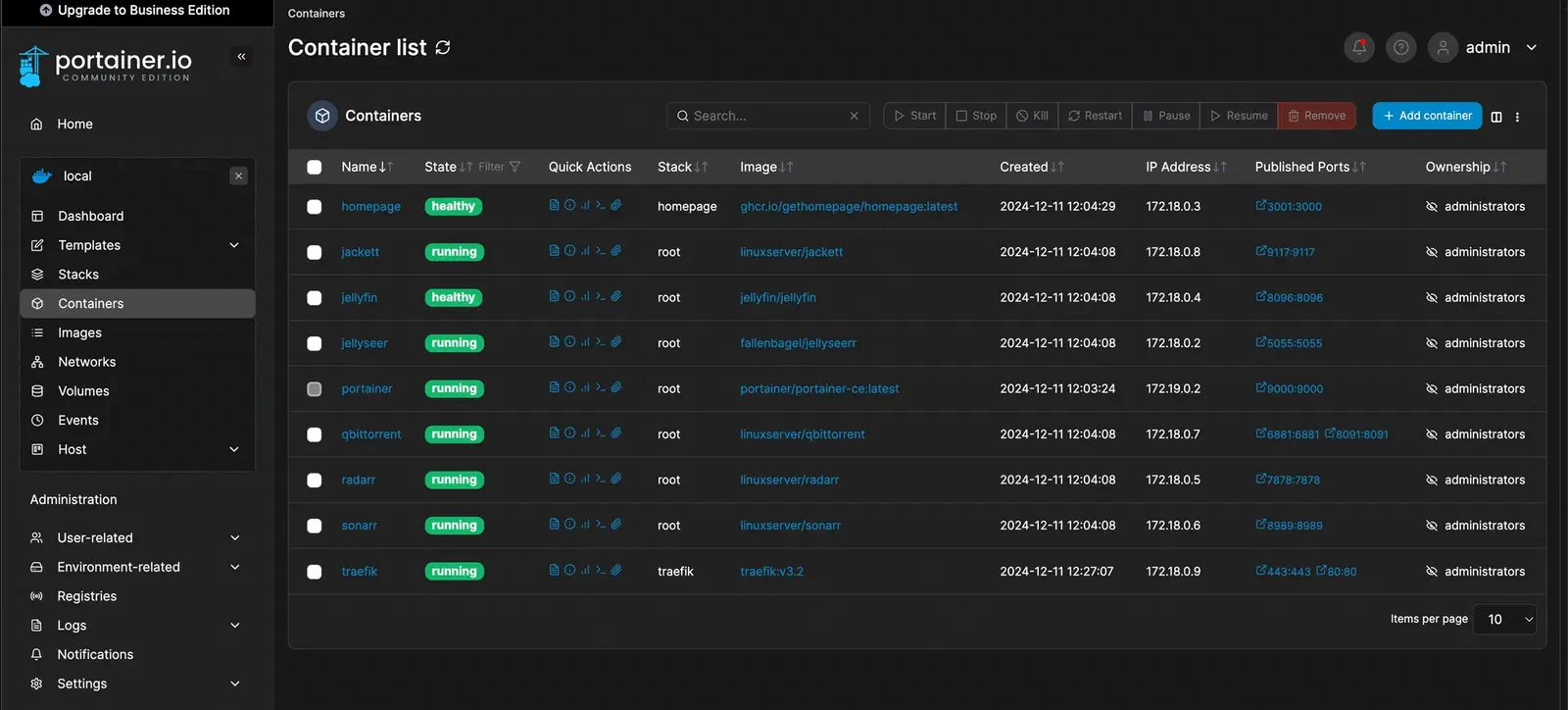
Portainer is on port 9000 of the VM’s address:
http://172.20.0.252:9000Create the admin user there and you should be looking at the dashboard above.
The thing to be honest about with a pipeline like this: it is excellent at building, and it does nothing about drift afterwards. Nothing here notices when a container has been down for a week. Check on it monthly, or put the state in Git and let something reconcile it — which is exactly the reasoning that eventually moved me to Flux.