
Built to be rebuilt.
Three Proxmox hosts, one Kubernetes cluster, and nothing that answers the internet. All of it comes back from a git repository and three keys in about thirty-five minutes — which is the only reason it is safe to keep changing.
- Hypervisor
- Proxmox VE
- Kubernetes
- Talos, Flux
- Network
- pfSense, Cilium
- Storage
- Synology, TrueNAS
- Power
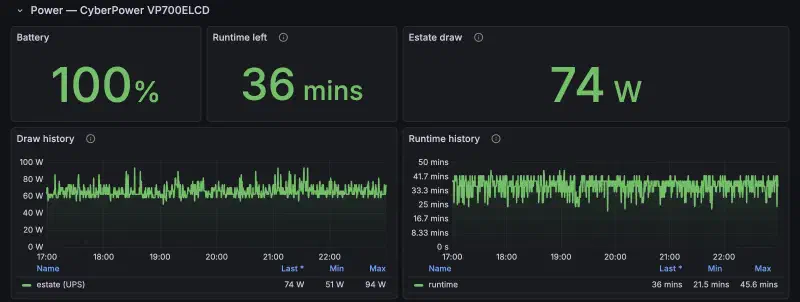
- ~65 W at the wall
Network
No way in.
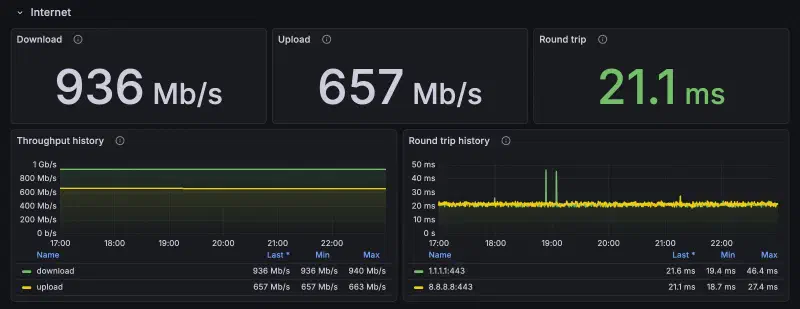
Nothing in the rack answers the internet. One UDP port is forwarded, for Tailscale’s direct WireGuard connections, and it ignores anything without a key. Every public name arrives through a tunnel that dials out.
| pfSense | Firewall and gateway on an XCY X44. Physical segmentation — one NIC per segment, not VLAN tags. |
| Tailscale | A subnet router puts the LAN on the tailnet, so the rack and the cloud VPS share one flat mesh. This is the way in. |
| Cloudflare Tunnel | Outbound-only, one per place that needs it: the cluster, the VPS, and the NAS for Synology Drive — so Drive stays up when Kubernetes does not. |
| Unbound | Recursive resolution, no upstream forwarder, with overrides for the internal names. |
Compute
Three small machines. One big one, asleep.
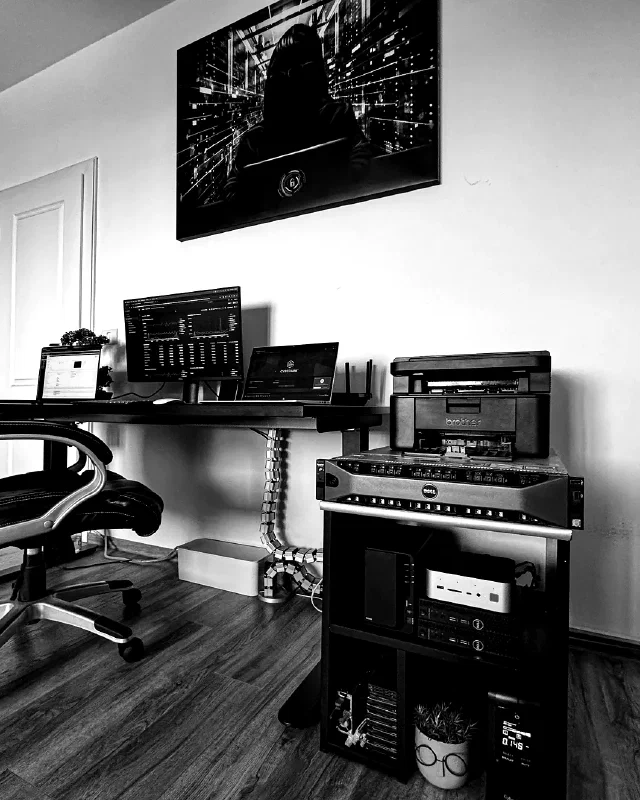
Standalone hosts, joined through Proxmox Datacenter Manager. One Kubernetes node each, on three different chassis. The R730xd that used to carry most of this is now the vault — off most of the day.
Beelink GTi13 Ultra
| CPU | Core i9-13900HK · 20 threads |
| Memory | 64 GB DDR5 |
| Node | kubernetes-1 · 14 cores / 32 GB |
| Why | Iris Xe passed through — every transcode happens here |
Dell OptiPlex 3050
| CPU | Core i5 · 4 cores |
| Memory | 32 GB DDR4 |
| Node | kubernetes-2 · 3 cores / 16 GB |
| Why | 960 GB D3-S4510 passed through raw — power-loss protection, the right disk for etcd |
Dell OptiPlex 3050
| CPU | Core i5-6500T · 4 cores |
| Memory | 32 GB DDR4 |
| Node | kubernetes-3 · plus PDM and Garage, Longhorn’s backup target |
| Why | The same D3-S4510, and the host that wakes the vault |
Dell PowerEdge R730xd
| CPU | Xeon E5-2630 v4 · 10C/20T |
| Memory | 251 GB DDR4 ECC |
| Runs | TrueNAS, nothing else |
| Why | Twelve SAS bays for the offline copy. Off about 22 hours a day |
Storage
One live store. One vault that sleeps.
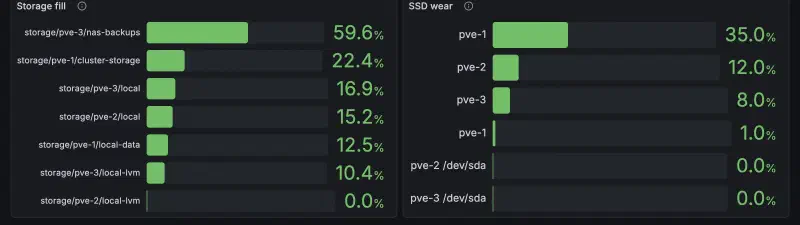
Everything that changes lives on a two-disk Synology: the film library, my files, my photos, and the landing spot of every backup. The cluster keeps only its own app volumes, on Longhorn, three replicas.
| Where | Layout | Holds |
|---|---|---|
| NAS · DS223 | 2 × 2 TB, mirrored | the live store — 1.1 TB of 1.8 TB used |
| vault · R730xd | 12 × 600 GB SAS, one RAIDZ3, encrypted | history: daily and monthly ZFS snapshots |
| Longhorn | NVMe on pve-1, D3-S4510 on pve-2 and pve-3 | app volumes, one replica per node |
I made twelve SAS disks park whenever nothing read them, and it worked — the story is in Spinning Down SAS Disks. Then I moved the live data to the NAS and let the whole R730xd power off instead. Parking a disk saves a few watts. Not running the server saves all of them.
Kubernetes
git push is the deploy.
Talos has no shell and no package manager — it is configured by API and by nothing else. Flux watches the repository and makes the cluster match it. There is no third way to change anything, which is what makes the rebuild time believable.
kubernetes/apps/
├── default/         jellyfin, the *arr stack, n8n
├── kube-system/     Cilium, CoreDNS, Intel GPU plugin
├── network/         gateway, Cloudflare tunnel, netboot.xyz
├── observability/   Prometheus, Grafana, Loki, Alloy
└── storage/         Longhorn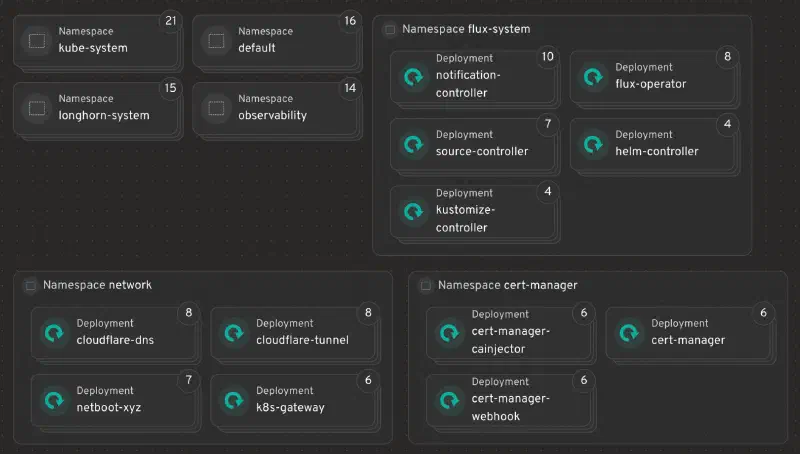
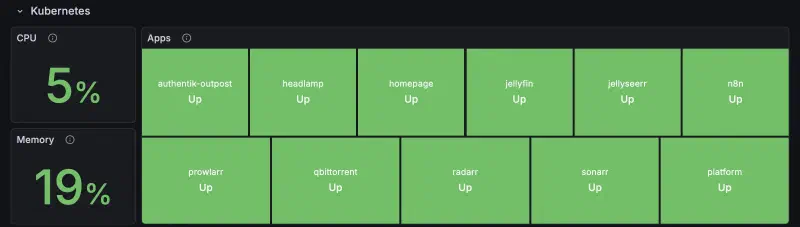
Services
What it actually runs.
Media and automation in the cluster, files and photos on the NAS, identity and remote access on the VPS. Everything with data behind it is declared in the repo.
Media
- Jellyfin: 4K, hardware transcoded
- Jellyseerr: requests, the one route that faces out
- Radarr · Sonarr: film and TV automation
- Prowlarr · qBittorrent: indexing and download, VPN-routed
Files & photos
- Synology Drive: files, synced to my Mac; in a browser from Romania only
- Synology Photos: the photo library, filed by country
- Joplin: notes sync
Platform
- Talos + Flux: the cluster and what reconciles it
- Longhorn: block storage, three replicas
- Cilium: eBPF CNI, Gateway API, L2
- cert-manager: certificates, renewed without asking
Edge & identity
- Traefik: reverse proxy on the VPS
- Authentik: single sign-on
- Guacamole: remote desktop in a tab
- Pi-hole + Unbound: filtering DNS, own resolver
Watching it
- Prometheus: metrics, hosts and cluster
- Grafana: dashboards
- Loki + Alloy: logs
- Alertmanager: straight to Telegram
Odds
- n8n: one workflow, the daily news digest
- Headlamp: Kubernetes, when a UI is faster
- Portainer: the VPS containers
- netboot.xyz: installers over the network
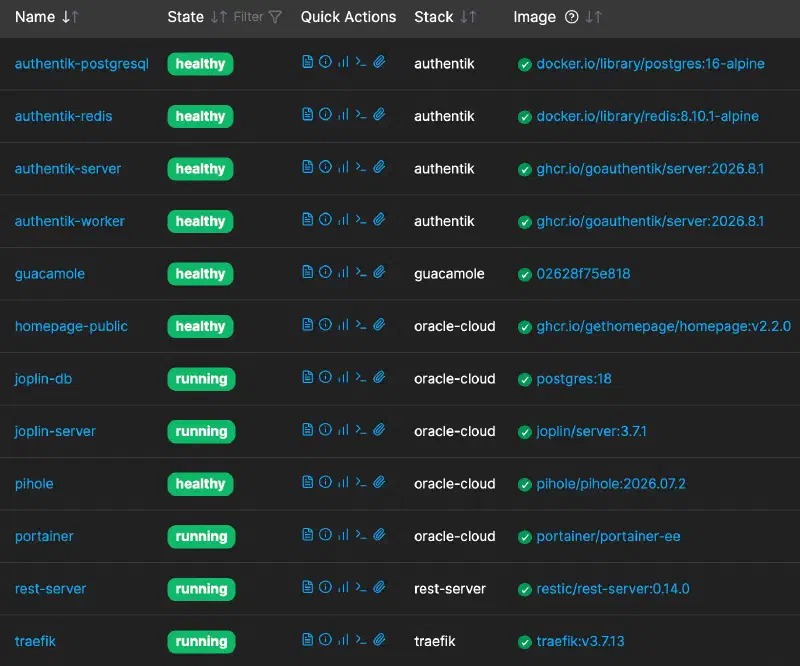
Alerting
Silence is the alarm.
Alertmanager, Flux, Proxmox and TrueNAS go straight to Telegram — critical and warning only, tagged by layer. Every scheduled job also pings healthchecks.io on its way out, so a job that stops running raises its own hand. Nobody has to notice.
A message gets read once, though, and then it scrolls away. So there is one page for looking on purpose: sixteen numbers that sit neutral on a good day and turn amber or red only when one needs me, and below them every console in the house, each with a dot that is its own health check. It answers only on the tailnet.
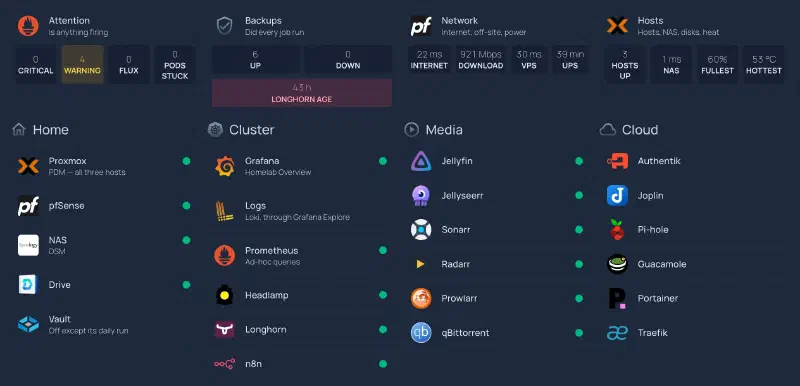
The first evening its Backups card had real data, it showed a job down: the monthly restore drill had been failing since August — Authentik one month, Joplin the next — while both dumps were intact. The drill was racing Postgres’s own start-up. The red in this picture is just as real: one night’s Longhorn backup failed, and the card stays that colour until a good one replaces it.
One of the four warnings never clears, and it is honest: if pve-1 died, the other two nodes could not hold everything it runs. I know, and I chose three small machines anyway.
Backup
Three copies. Nothing can delete them.
Every producer writes the one thing it owns to the NAS. Once a day the vault wakes, pulls the NAS read-only, snapshots it, pushes it to Oracle, and powers itself off. Nothing holds a credential into the vault, and Oracle’s restic server is append-only — its retention runs on the VPS, never from home.
flowchart LR
  lh["Longhorn · Garage"] --> nas["Synology NAS
latest only"]
  pf["pfSense config"] --> nas
  vps["VPS services"] --> nas
  files["Files · Photos"] --> nas
  nas -- "daily, pulled read-only" --> vault["R730xd vault
30 days + 12 months"]
  vault -- "daily, append-only" --> oc["Oracle Cloud
cannot be pruned from home"]
A new producer gets both further copies for free by writing to the NAS. A compromised one can overwrite its own latest copy there and nothing further: the vault keeps the old version beside the new, and a pull that would delete more than 500 files stops before it snapshots anything.
Losing any single copy is a non-event. On the first of every month the vault restores a sample from Oracle and compares checksums, rather than trusting that it could.
Recovery
Drilled, then done for real.
- cluster restore
- ~35 min
- onto different hardware, from git and object storage
- VPS rebuild
- ~15 min
- from nothing
- found by the drill
- 4 + 1
- tooling bugs, and one library excluded from every restore
Cluster restored onto different hardware. Drilled on 29 August, then done for real on 1 September — from git and object storage, in about thirty-five minutes. The VPS rebuilds from nothing in about fifteen.
The drill is the point. It found four tooling bugs and one library that had been quietly excluded from every restore for months — none of which a backup report would have shown.
Questions
The ones every rack post gets.
Why no Proxmox cluster?
What does it draw?
Why keep the R730xd at all?
Tech specs
All of it, in order.
| Hypervisor | Proxmox VE on three standalone hosts, joined by Proxmox Datacenter Manager. No corosync, no HA — deliberate. |
| Kubernetes | Talos Linux, three control planes, one per physical machine. Flux reconciles from GitHub. |
| Networking | pfSense on an XCY X44. Physical segmentation, one NIC per segment. Cilium for CNI, Gateway API and L2 announcement. |
| Storage | Synology DS223, two disks mirrored — the live store for media, files, photos and backups. NFS to the cluster nodes only, one rule per client. Longhorn for app volumes, three replicas. |
| Off-site | Oracle Cloud Free Tier, Ampere A1 — 4 vCPU ARM, 24 GB, 200 GB. Traefik, Authentik, Guacamole, Joplin, Pi-hole, the public dashboard and an append-only restic server. |
| Offline copy | Dell R730xd on TrueNAS. 12 × 600 GB SAS in one encrypted RAIDZ3. Wakes once a day, pulls the NAS read-only, snapshots, pushes to Oracle, powers off. |
| Power | CyberPower VP700ELCD, monitored by NUT. ~65 W total, averaged over two days with the vault’s daily run included — down from ~165 W while the R730xd ran around the clock. |
| Noise | The R730xd is off most of the day. While it runs, a daemon takes the fans off iDRAC and holds a 1680 RPM floor, about 18 dB under stock. |
| Secrets | SOPS/age for Kubernetes, Ansible Vault for the VPS. Three keys cannot be lost; nothing else is irreplaceable. |
Everything above is in one repository, and inside.merox.dev shows it running.