
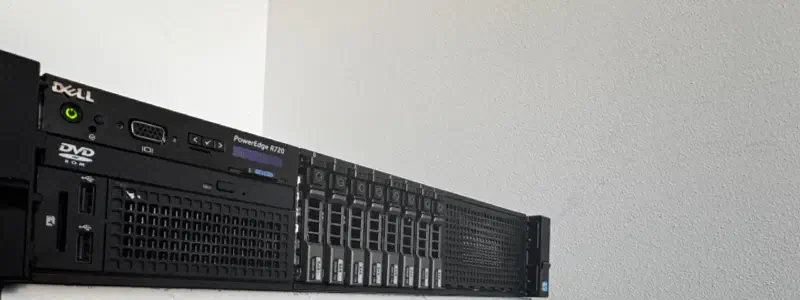
Specs#
- Form factor: 2U rack
- RAM: 192GB ECC DDR3
- CPUs: Dual Intel Xeon E5-2697v2
- iDRAC: iDRAC7 Enterprise
- Storage: 2× 2TB SSD (RAID 1) + 6× 300GB SAS 6Gb/s (RAID 10)
- Network: Dual-port integrated Gigabit Ethernet
- PSU: Dual redundant (750W each)
What it draws with this config:
120–150 W
idle
200–250 W
under load
~300 W
peak
It arrived broken#
The front backplane was disconnected, because the mini SAS cable that came with it was too short to reach. A 59cm cable fixed it. Worth checking before you conclude the backplane is dead — no drives are detected either way, and the two look identical from the OS.
Fan control over IPMI#
The R720 is loud out of the box, and the default curve doesn’t care that the room it’s in is not a datacentre. IPMItool takes the fans off automatic over the network, through iDRAC.
sudo apt-get install ipmitool

# Take manual control
ipmitool -I lanplus -H ip_addr -U username -P password raw 0x30 0x30 0x01 0x00

# Hand it back to the firmware
ipmitool -I lanplus -H ip_addr -U username -P password raw 0x30 0x30 0x01 0x01

# Set a fixed speed — last byte is the percentage, in hex
ipmitool -I lanplus -H ip_addr -U username -P password raw 0x30 0x30 0x02 0xff 0x14Manual mode means exactly that — the firmware stops raising the fans when things get hot. Set a floor you’re comfortable leaving unattended, and hand control back before anything that loads the machine hard. Mine sits at 0x14.
What the last byte buys you:
| Percent | Hex | RPM |
|---|---|---|
| 10% | 0x0A | ~3,300 RPM |
| 16% | 0x10 | ~3,900 RPM |
| 20% | 0x14 | ~4,000 RPM |
| 25% | 0x19 | ~4,700 RPM |
| 30% | 0x1E | ~5,400 RPM |
| 40% | 0x28 | ~7,300 RPM |
| 50% | 0x32 | ~8,000 RPM |
| 60% | 0x3C | ~9,400 RPM |
| 70% | 0x46 | ~10,800 RPM |
| 80% | 0x50 | ~12,100 RPM |
| 90% | 0x5A | ~13,300 RPM |
| 100% | 0x64 | 15,000 RPM |
And to see what they’re actually doing:
ipmitool sensor | grep -i fanFirmware, without a support contract#
Dell retired the FTP repository iDRAC used to update from. Kenneth Finnegan runs a community mirror of it, and iDRAC can still pull from that — you only have to tell it which generation you are. Wikipedia’s PowerEdge list has the mapping: the R720 is gen 12, so g12.
- 1
Open the updater
In the iDRAC web interface, Maintenance → System Update. - 2
Point it at the mirror
Select FTP: addressftp.updateyodell.net, userdell, passwordcalvin, pathg12. - 3
Apply
Check for Updates, then apply what it finds.
Moving Proxmox onto it#
An NFS share on the Synology DS223 was the whole migration path. Add it to the new host as backup storage, and the vzdump archives already on it become restorable:
pvesm add nfs synology --server <synology_ip> --export /volume1/proxmox --content backuppct restore <vmid> /mnt/pve/synology/dump/vzdump-lxc-<vmid>-<timestamp>.tar.zst --storage local-lvmqmrestore /mnt/pve/synology/dump/vzdump-qemu-<vmid>-<timestamp>.vma.zst <vmid> --storage local-lvmStorage#
Two 2TB SSDs in RAID 1 for the OS and primary applications. Six 300GB SAS drives in RAID 10 for data — gives you the read performance of striping with redundancy against single drive failures. Configured through the PERC controller during initial setup.
UPS, on PowerPanel#
CyberPower UPS, and I went with PowerPanel rather than NUT — vendor tool, vendor hardware, one less integration to debug.
curl -fL -o powerpanel.deb 'https://www.cyberpower.com/tw/en/File/GetFileSampleByType?fileId=SU-18070001-06&fileType=Download%20Center&fileSubType=FileOriginal'
dpkg -i powerpanel.deb
The quotes matter: unquoted, the shell cuts the URL at the first & and runs the rest as background jobs.
The policy is one line, and the two thresholds are an OR:
pwrstat -lowbatt -runtime 300 -capacity 35 -active on -cmd /etc/pwrstatd-lowbatt.sh -duration 1 -shutdown onThis triggers a graceful shutdown when runtime drops below 300 seconds or battery capacity falls under 35%, with a 1-minute delay before executing. The script at /etc/pwrstatd-lowbatt.sh handles any pre-shutdown tasks you want to run.
References#
- Dell & HP Server Manual Fan Control
- Kenneth Finnegan — Update your old ass Dell servers
- NOiSEA — CyberPower PowerPanel on Proxmox Forum