Tailscale Site-to-Site: pfSense to Linux
How to set up a Tailscale site-to-site L3 connection between a pfSense homelab subnet and a Linux cloud VM subnet.
I wanted an Oracle Cloud VM to be the single entry point to my homelab — monitoring reaching in, nothing listening on my home connection. Client-to-site would have given me access from a laptop. Site-to-site gives the two subnets each other, which is what monitoring actually needs.
Both sides run a subnet router. The machines behind them need nothing installed, only a route to the other side.
flowchart LR
  subgraph home["Homelab · 10.57.57.0/24"]
    hh["hosts"] --- pf["pfSense<br/>10.57.57.1"]
  end
  subgraph cloud["Cloudlab · 192.168.57.0/24"]
    vm["Linux VM<br/>192.168.57.254"] --- ch["hosts"]
  end
pf <-- "tailnet" --> vmpfSense side
Tailscale on pfSense is a FreeBSD port and it shows. Everything below works, but expect the UI to be a step behind the Linux client.
Install from System > Package Manager > Available Packages, then go to VPN > Tailscale and paste in an auth key from the admin console.
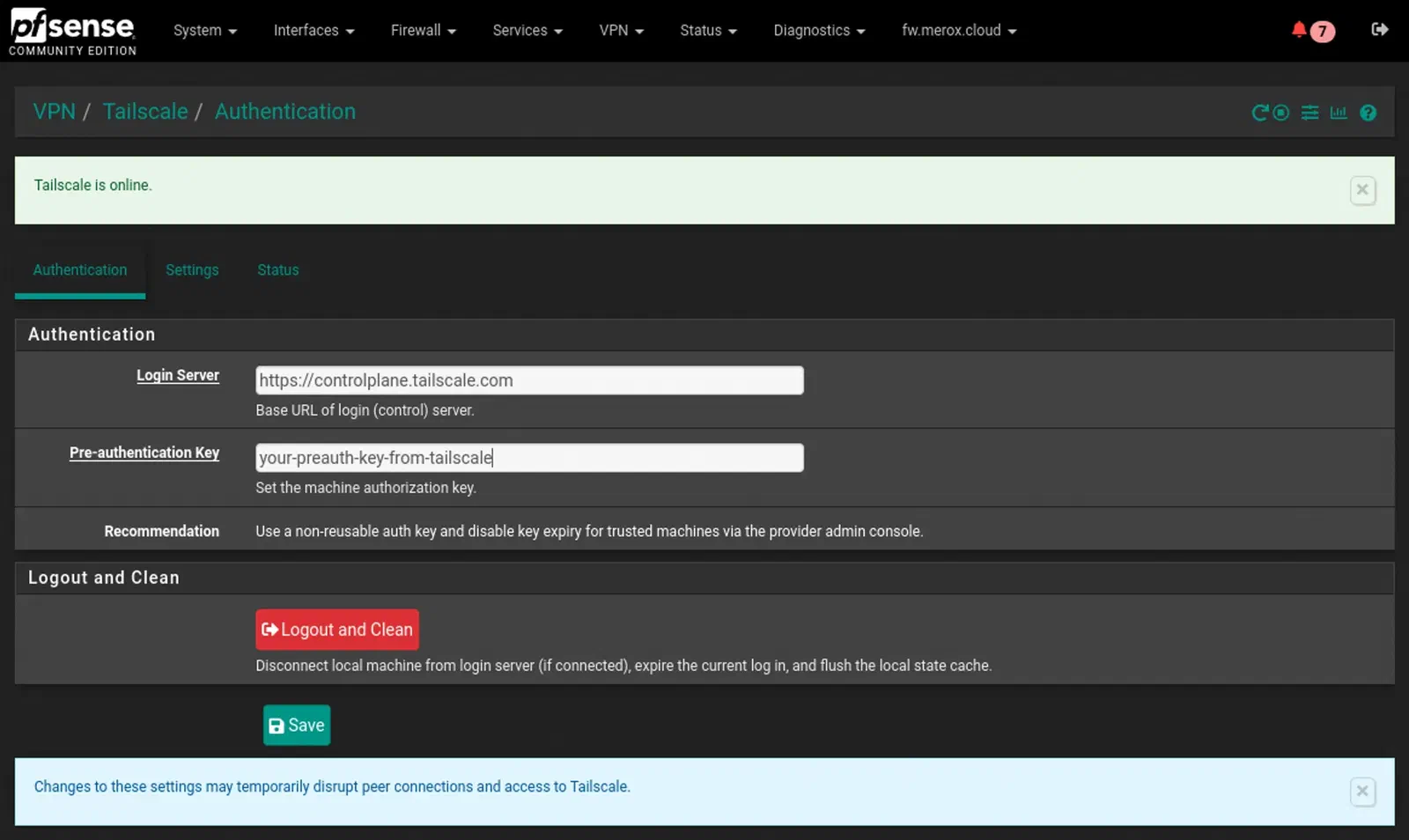
- Enable Tailscale
- Accept Subnet Routes
- Advertised Routes:
10.57.57.0/24 - Advertise Exit Node — optional, unrelated to site-to-site
- Listen port: leave it
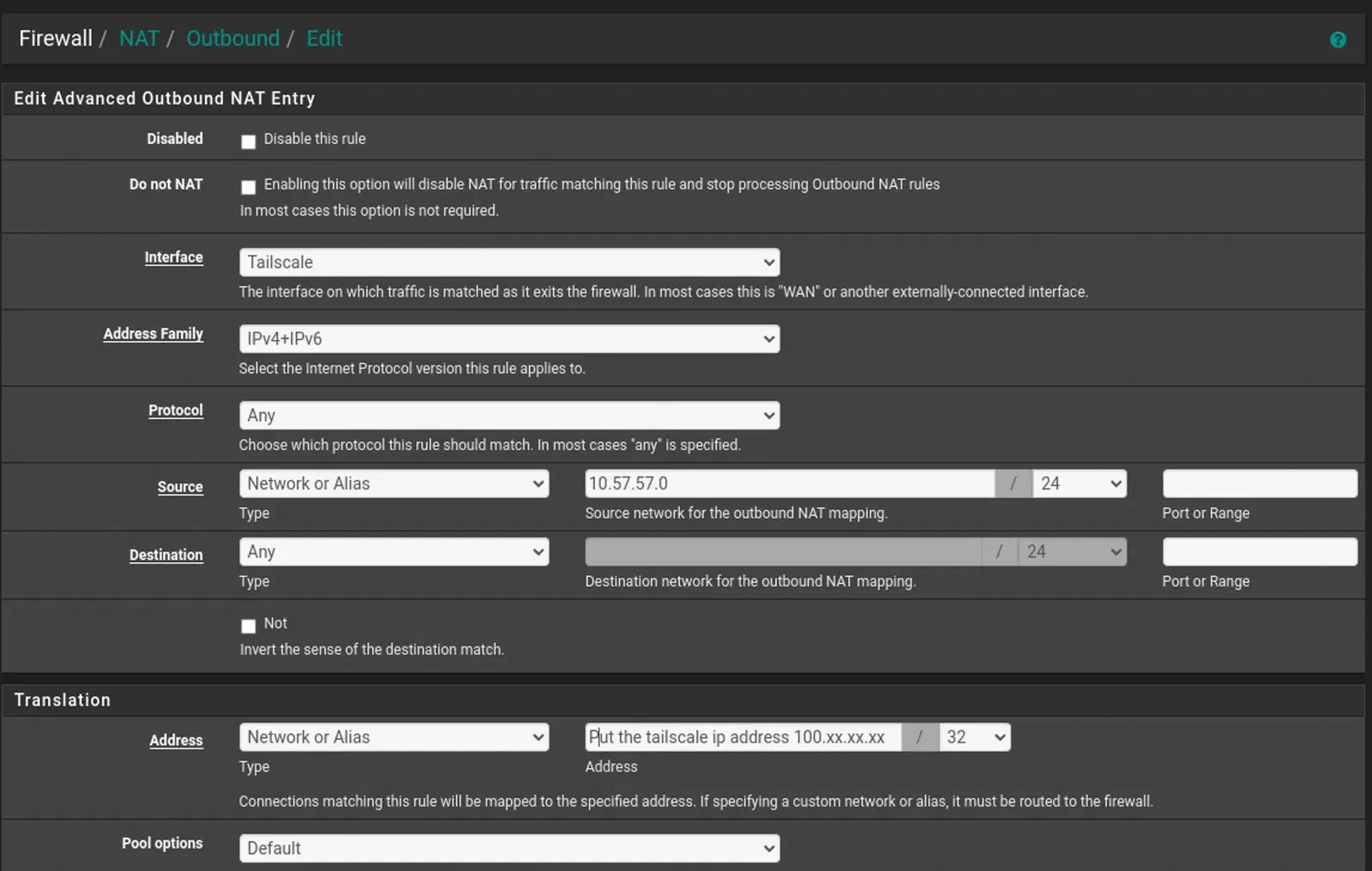
Then Firewall > NAT > Outbound, mode Hybrid Outbound NAT, one manual mapping: interface Tailscale, address family IPv4+IPv6, protocol any, source 10.57.57.0/24, destination any.
Linux side
curl -fsSL https://tailscale.com/install.sh | sh

# Forward IPv4 and IPv6 between interfaces, persistently
printf 'net.ipv4.ip_forward = 1\nnet.ipv6.conf.all.forwarding = 1\n' \
  | sudo tee /etc/sysctl.d/99-tailscale.conf
sudo sysctl -p /etc/sysctl.d/99-tailscale.conf
Bring it up on the 192.168.57.254 device:
tailscale up --advertise-routes=192.168.57.0/24 --snat-subnet-routes=false --accept-routes--snat-subnet-routes=false is the flag that makes this site-to-site rather than a one-way tunnel. Without it the destination sees the subnet router’s IP instead of the real source host, and return traffic across two networks has nowhere to go. --accept-routes is the other half — it’s what makes this node take the routes pfSense is advertising.
Approve the routes
Advertised is not the same as routed. Until you approve them, both sides are up, connected, and completely unable to reach each other.
In the admin console, open Machines, filter by property:subnet, and on each subnet router use the ellipsis menu → Edit route settings → approve. Skip this if you already have autoApprovers configured.
Route the hosts behind each router
pfSense is the default gateway of the homelab, so its hosts already send 192.168.57.0/24 the right way. On the cloud side the VM is not the gateway, and two things in Oracle Cloud stand between it and forwarding:
- On the VM’s VNIC, enable Skip source/destination check. Without it OCI drops every packet the VM forwards, because the source address isn’t its own.
- In the subnet’s route table, add a rule for
10.57.57.0/24with the VM’s private IP as the target.
Any other cloud, or a plain LAN, needs the same route: the other site’s CIDR via the local subnet router.
References
- Tailscale site-to-site documentation
- Christian McDonald — pfSense Tailscale walkthrough