How to Set Up a K3S Cluster in 2025
Rebuilding my K3s cluster from scratch with Ansible — VM provisioning via Cloud-Init on Proxmox, HA across three nodes, and full automation.
Note
I’ve since moved this cluster to Talos + FluxCD GitOps, but everything here is still valid if you’re running k3s on Proxmox.
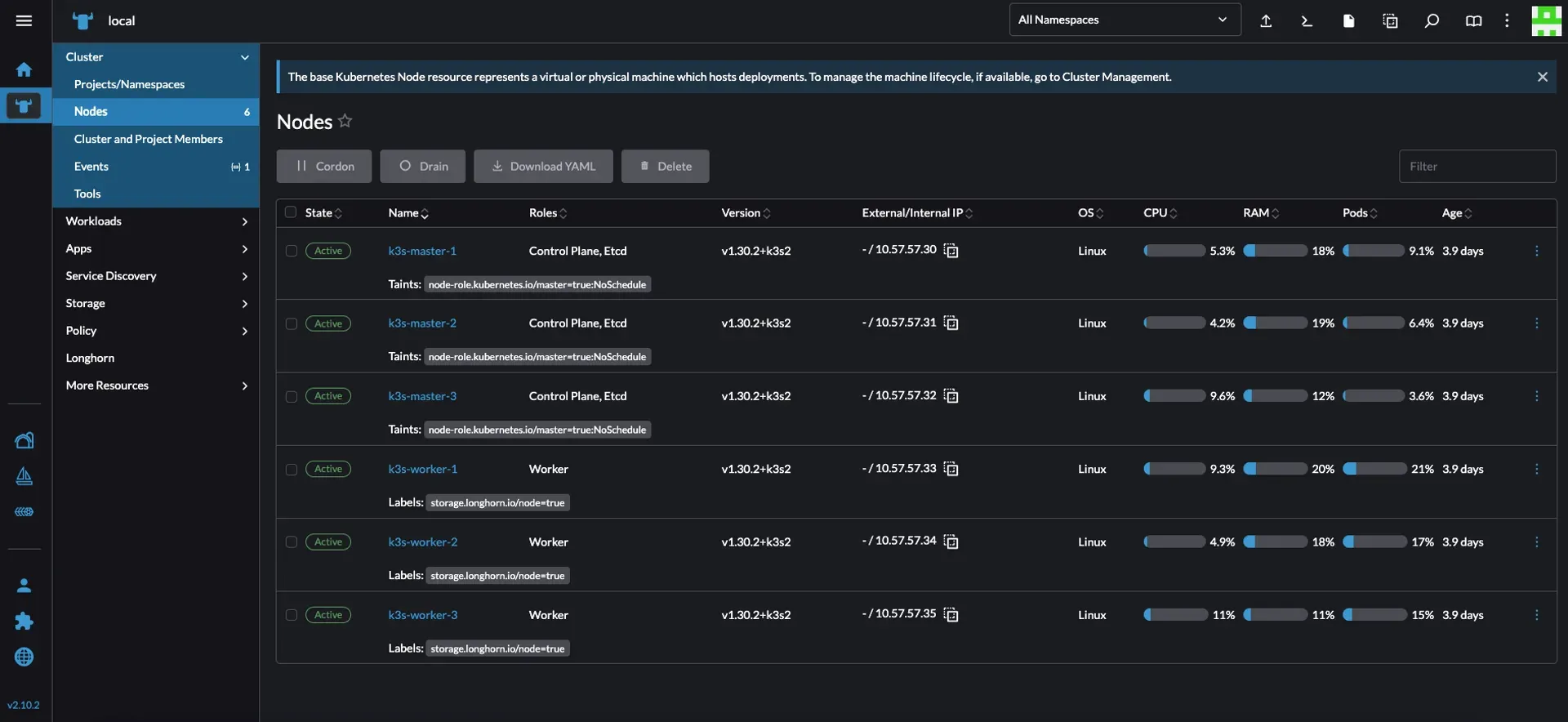
My first Kubernetes clusters are gone. This time I want a proper HA setup — if any machine goes down, the cluster keeps running. The target layout across my hardware:
- 1× DELL R720 →
k3s-master-1andk3s-worker-1 - 1× DELL Optiplex Micro 3050 →
k3s-master-2andk3s-worker-2 - 1× DELL Optiplex Micro 3050 →
k3s-master-3andk3s-worker-3
Six VMs total on a Proxmox cluster: 3 Ubuntu 22.04 master nodes, 3 Ubuntu 22.04 worker nodes.
DNS and IP Addressing
Before creating any VMs, get your IP and DNS situation sorted.
For IP assignment, you have two options: assign addresses outside your DHCP range (what I do — network stays stable even if DHCP goes down), or use static MAC→IP mappings in your DHCP server.
I’m using 10.57.57.30/24 through 10.57.57.35/24 for the six VMs, with an A record in Unbound on pfSense for each:

VM Deployment with Cloud-Init
Rather than clicking through the Proxmox UI six times, I wrote a bash script that handles template creation, VM deployment, and teardown. If you’d prefer a Packer/Terraform approach, see Homelab as Code.
Warning
This script can create or destroy VMs. Keep backups of anything critical before running option 3.
Prerequisites: Proxmox up and running, SSH public key at /root/.ssh/id_rsa.pub on the Proxmox host.
The script has three modes:
Option 1 — Create Cloud-Init Template: Downloads the Ubuntu 24.04 cloud image, creates a VM, configures cloud-init, and converts it to a template.
Option 2 — Deploy VMs: Clones the template N times, sets IPs, gateway, DNS, search domain, SSH keys, CPU, RAM, and disk size per VM. Prompts for a name on each one.
Option 3 — Destroy VMs: Stops and removes VMs by ID range.
#!/bin/bash
# Function to get user input with a default valueget_input() { local prompt=$1 local default=$2 local input read -p "$prompt [$default]: " input echo "${input:-$default}"}
# Ask the user whether they want to create a template, deploy or destroy VMsecho "Select an option:"echo "1) Create Cloud-Init Template"echo "2) Deploy VMs"echo "3) Destroy VMs"read -p "Enter your choice (1, 2, or 3): " ACTION
if [[ "$ACTION" != "1" && "$ACTION" != "2" && "$ACTION" != "3" ]]; then echo "❌ Invalid choice. Please run the script again and select 1, 2, or 3." exit 1fi
# === OPTION 1: CREATE CLOUD-INIT TEMPLATE ===120 collapsed lines
if [[ "$ACTION" == "1" ]]; then TEMPLATE_ID=$(get_input "Enter the template VM ID" "300") STORAGE=$(get_input "Enter the storage name" "local") TEMPLATE_NAME=$(get_input "Enter the template name" "ubuntu-cloud") IMG_URL="https://cloud-images.ubuntu.com/noble/current/noble-server-cloudimg-amd64.img" IMG_FILE="/root/noble-server-cloudimg-amd64.img"
echo "📥 Downloading Ubuntu Cloud image for cloud-init setup..." cd /root wget -O $IMG_FILE $IMG_URL || { echo "❌ Failed to download the image"; exit 1; }
echo "🖥️ Creating VM $TEMPLATE_ID..." qm create $TEMPLATE_ID --memory 2048 --cores 2 --name $TEMPLATE_NAME --net0 virtio,bridge=vmbr0
echo "💾 Importing disk to storage ($STORAGE)..." qm disk import $TEMPLATE_ID $IMG_FILE $STORAGE || { echo "❌ Failed to import disk"; exit 1; }
echo "🔗 Attaching disk..." qm set $TEMPLATE_ID --scsihw virtio-scsi-pci --scsi0 $STORAGE:vm-$TEMPLATE_ID-disk-0
echo "☁️ Adding Cloud-Init drive..." qm set $TEMPLATE_ID --ide2 $STORAGE:cloudinit
echo "🛠️ Configuring boot settings..." qm set $TEMPLATE_ID --boot c --bootdisk scsi0
echo "🖧 Adding serial console..." qm set $TEMPLATE_ID --serial0 socket --vga serial0
echo "📌 Converting VM to template..." qm template $TEMPLATE_ID
echo "✅ Cloud-Init Template created successfully!" exit 0fi
# === OPTION 2: DEPLOY VMs ===if [[ "$ACTION" == "2" ]]; then TEMPLATE_ID=$(get_input "Enter the template VM ID" "300") START_ID=$(get_input "Enter the starting VM ID" "301") NUM_VMS=$(get_input "Enter the number of VMs to deploy" "6") STORAGE=$(get_input "Enter the storage name" "dataz2") IP_PREFIX=$(get_input "Enter the IP prefix (e.g., 10.57.57.)" "10.57.57.") IP_START=$(get_input "Enter the starting IP last octet" "30") GATEWAY=$(get_input "Enter the gateway IP" "10.57.57.1") DNS_SERVERS=$(get_input "Enter the DNS servers (space-separated)" "8.8.8.8 1.1.1.1") DOMAIN_SEARCH=$(get_input "Enter the search domain" "merox.dev") DISK_SIZE=$(get_input "Enter the disk size (e.g., 100G)" "100G") RAM_SIZE=$(get_input "Enter the RAM size in MB" "16384") CPU_CORES=$(get_input "Enter the number of CPU cores" "4") CPU_SOCKETS=$(get_input "Enter the number of CPU sockets" "4") SSH_KEY_PATH=$(get_input "Enter the SSH public key file path" "/root/.ssh/id_rsa.pub")
if [[ ! -f "$SSH_KEY_PATH" ]]; then echo "❌ Error: SSH key file not found at $SSH_KEY_PATH" exit 1 fi
for i in $(seq 0 $((NUM_VMS - 1))); do VM_ID=$((START_ID + i)) IP="$IP_PREFIX$((IP_START + i))/24" VM_NAME=$(get_input "Enter the name for VM $VM_ID" "ubuntu-vm-$((i+1))")
echo "🔹 Creating VM: $VM_ID (Name: $VM_NAME, IP: $IP)"
if qm status $VM_ID &>/dev/null; then echo "⚠️ VM $VM_ID already exists, removing..." qm stop $VM_ID &>/dev/null qm destroy $VM_ID fi
if ! qm clone $TEMPLATE_ID $VM_ID --full --name $VM_NAME --storage $STORAGE; then echo "❌ Failed to clone VM $VM_ID, skipping..." continue fi
qm set $VM_ID --memory $RAM_SIZE \ --cores $CPU_CORES \ --sockets $CPU_SOCKETS \ --cpu host \ --serial0 socket \ --vga serial0 \ --ipconfig0 ip=$IP,gw=$GATEWAY \ --nameserver "$DNS_SERVERS" \ --searchdomain "$DOMAIN_SEARCH" \ --sshkey "$SSH_KEY_PATH"
qm set $VM_ID --delete ide2 || true qm set $VM_ID --ide2 $STORAGE:cloudinit,media=cdrom qm cloudinit update $VM_ID
echo "🔄 Resizing disk to $DISK_SIZE..." qm resize $VM_ID scsi0 +$DISK_SIZE
qm start $VM_ID echo "✅ VM $VM_ID ($VM_NAME) created and started!" done exit 0fi
# === OPTION 3: DESTROY VMs ===if [[ "$ACTION" == "3" ]]; then START_ID=$(get_input "Enter the starting VM ID to delete" "301") NUM_VMS=$(get_input "Enter the number of VMs to delete" "6")
echo "⚠️ Destroying VMs from $START_ID to $((START_ID + NUM_VMS - 1))..." for i in $(seq 0 $((NUM_VMS - 1))); do VM_ID=$((START_ID + i))
if qm status $VM_ID &>/dev/null; then echo "🛑 Stopping and destroying VM $VM_ID..." qm stop $VM_ID &>/dev/null qm destroy $VM_ID else echo "ℹ️ VM $VM_ID does not exist. Skipping..." fi done echo "✅ Specified VMs have been destroyed." exit 0fiAfter running option 2, verify the VMs appear in Proxmox and SSH in:
ssh ubuntu@k3s-master-01