Five AI Agents Running My Infrastructure
How I settled on five dedicated OpenClaw agents — news briefing, infrastructure monitoring, backup verification, dashboard automation, and an orchestrator — running securely as a dedicated user with a custom command center dashboard.
The original version of this post described a single OpenClaw agent running as root, with one skill file for infra ops. That worked, but it missed the point of what the tool can actually do.
This is the current setup: five specialized agents, a dedicated non-root user, and a command center dashboard at agents.cloud.merox.dev. Everything is templated in the infra repo so I can rebuild from scratch in 15 minutes.
Why split them at all
One agent trying to do everything becomes a compromise. The system prompt grows, context gets polluted between domains, and the “personality” that makes an agent useful for one task makes it annoying for another.
| Agent | Purpose | Runs |
|---|---|---|
news |
Morning briefing in Romanian — tech stack updates, CVEs filtered to installed stack, community news | Daily 04:00 UTC |
infra |
K8s cluster + VPS health checks, security alerts | 2× daily (08:00 + 20:00 UTC) |
costs |
Backup verification, resource tracking, storage trends | Weekly (Sun 09:00 UTC) |
dashboard |
Nightly audit + improvement of the command center dashboard | Daily 23:00 UTC |
orchestrator |
Monitors all agents, auto-fixes safe issues, proposes improvements via Telegram | Daily 12:00 UTC |
Each agent has its own workspace directory, its own AGENTS.md (operating instructions), SOUL.md (personality), and sometimes HEARTBEAT.md (what to do proactively). They send Telegram messages on their own — no prompting needed.
Architecture
Phone / Laptop │ └── Telegram ──────────────────────────► openclaw gateway (tailnet:18789) │ openclaw user (non-root) │ Claude Code CLI (Pro OAuth) │ ┌──────────┬──────────┬──────────┬──────────┬───────────┐ news infra costs dashboard orchestrator │ │ │ │ │ web search kubectl/flux S3 /srv/dashboard agents.json /srv/dashboard talosctl/docker backup index.html proposals.jsonThe gateway runs as a systemd user service under a dedicated openclaw user. No root. The agent workspaces describe what each agent manages and how it should behave. Claude figures out the commands to run.
Security model
This is where the previous setup was weak: running as root because it was easier. The new setup:
A user with the minimum it needs
useradd -m -s /bin/bash openclawusermod -aG docker openclawloginctl enable-linger openclawSudoers, scoped to exact binaries
Two files:
/etc/sudoers.d/openclaw — infra tooling:
Defaults:openclaw !requirettyopenclaw ALL=(ALL) NOPASSWD: /usr/bin/kubectlopenclaw ALL=(ALL) NOPASSWD: /usr/bin/fluxopenclaw ALL=(ALL) NOPASSWD: /usr/bin/talosctlopenclaw ALL=(ALL) NOPASSWD: /bin/systemctl status *openclaw ALL=(ALL) NOPASSWD: /usr/bin/systemctl status *openclaw ALL=(ALL) NOPASSWD: /usr/bin/node/etc/sudoers.d/openclaw-fix-perms — permissions automation:
openclaw ALL=(root) NOPASSWD: /usr/local/bin/openclaw-fix-permsDocker group membership handles container access. kubectl and talosctl get dedicated config files copied to /home/openclaw/.kube/ and /home/openclaw/.talos/. The agents are explicitly blocked from reading age.key, *.sops.yaml, and .env files — this is enforced in AGENTS.md, not just hoped for.
The Claude Code permissions problem
The gateway runs as openclaw, but if you interact with workspace files as root (e.g. via Claude Code CLI), any file you touch becomes root:root and the agents can’t write to it. The fix is a script that runs every 5 minutes and corrects ownership:
chown -R openclaw:openclaw /home/openclaw/.openclaw/chown -R openclaw:openclaw /srv/dashboard/# Update scripts stay root-owned intentionallychown root:root /srv/dashboard/update-*.shchown -R openclaw:openclaw /srv/merox/src/content/blog/Root crontab: */5 * * * * /usr/local/bin/openclaw-fix-perms
Systemd service: ExecStartPost=/usr/bin/sudo /usr/local/bin/openclaw-fix-perms
This means: even if you edit workspace files as root, they’re back to openclaw ownership within 5 minutes. No manual fixup needed.
Gateway on the tailnet only
{ gateway: { bind: "tailnet", auth: { mode: "token" } }}The gateway listens on the Tailscale interface directly — accessible from any Tailscale device without a port forward, but not exposed on the public internet.
Telegram allowlist
{ channels: { telegram: { botToken: "...", allowFrom: ["YOUR_NUMERIC_ID"] } }}Only your Telegram user ID can interact with the bot. Anyone else gets ignored at the gateway level, not the agent level.
Workspace files
OpenClaw’s workspace system is the key difference from a SKILL.md single-file approach. Each agent gets a directory with:
workspace-infra/├── AGENTS.md # operating instructions — what to check, how to respond├── SOUL.md # personality — paranoid SRE tone, factual, no false positives├── HEARTBEAT.md # what to do proactively on each scheduled tick└── TOOLS.md # local notes — paths, commands, how to update the dashboardThe content matters more than the format. Here’s what actually makes the infra agent useful:
AGENTS.md (excerpt):
## Security check (2x/day via heartbeat)
kubectl get nodeskubectl get pods -A | grep -v Running | grep -v Completeddocker ps --format "{{.Names}}\t{{.Status}}" | grep -v "Up"df -h
Report on Telegram ONLY if there is a real problem.Do not send "everything is ok" every check.SOUL.md (infra agent):
You are an SRE with healthy paranoia. You don't dramatize, but you don't minimize.
- "Trust but verify" — check live, don't assume- Silence is golden — no false positives; when you send, it's real- When you don't know something, say soHEARTBEAT.md (news agent):
Triggered daily at 04:00 UTC. Trigger message: MORNING_RUN.
You are running headless — use tools for every step, never output the briefing as text.
1. Read /srv/dashboard/data/news-releases.json (GitHub releases, pre-fetched every 6h)2. Check memory/ for the last 3 days — no repeats3. Collect tech & community news: Hacker News API, Reddit r/homelab + r/selfhosted, web search (CVEs, AI releases, infra news), GitHub trending4. Write /srv/dashboard/data/news.json — dashboard data, BEFORE the HTML5. Write /srv/dashboard/news.html — full HTML briefing6. Send Telegram via Python urllib (not response text)7. Update /srv/dashboard/data/agents.json8. Save to memory/YYYY-MM-DD.md
CVE rules: only alert if it affects the exact installed version on K8s clusteror Oracle VPS. gRPC/OpenSSL/Go runtime CVEs only if a specific service isdirectly affected — not "K8s uses this internally". Scanner noise = skip.The command center dashboard
Each agent writes to /srv/dashboard/data/ — JSON files that a static HTML page reads and renders:
/srv/dashboard/├── index.html # command center — all agents status├── news.html # latest news briefing (written by news agent)└── data/ ├── agents.json # status + last run per agent ├── news.json # structured news items (written by news agent) ├── news-releases.json # GitHub releases pre-fetch (written by update-news.sh) ├── infra.json # live cluster/VPS metrics (written by update-infra.sh) ├── backup.json # backup verification results ├── upgrades.json # open Renovate PRs ├── weather.json # hyperlocal weather — Open-Meteo, no API key (update-weather.sh) ├── network.json # subnet scan — homelab LAN + WiFi + Tailscale (update-network.sh) ├── calendar.json # iCloud CalDAV events today + next 3 days (update-calendar.sh) ├── shared-memory.json # cross-agent context (what agents flagged recently, suppressions) ├── orchestrator.json # orchestrator run history └── proposals.json # pending improvement proposalsThe page auto-refreshes every 60 seconds. Dark mode, card-based layout. No backend needed — nginx serves static files.
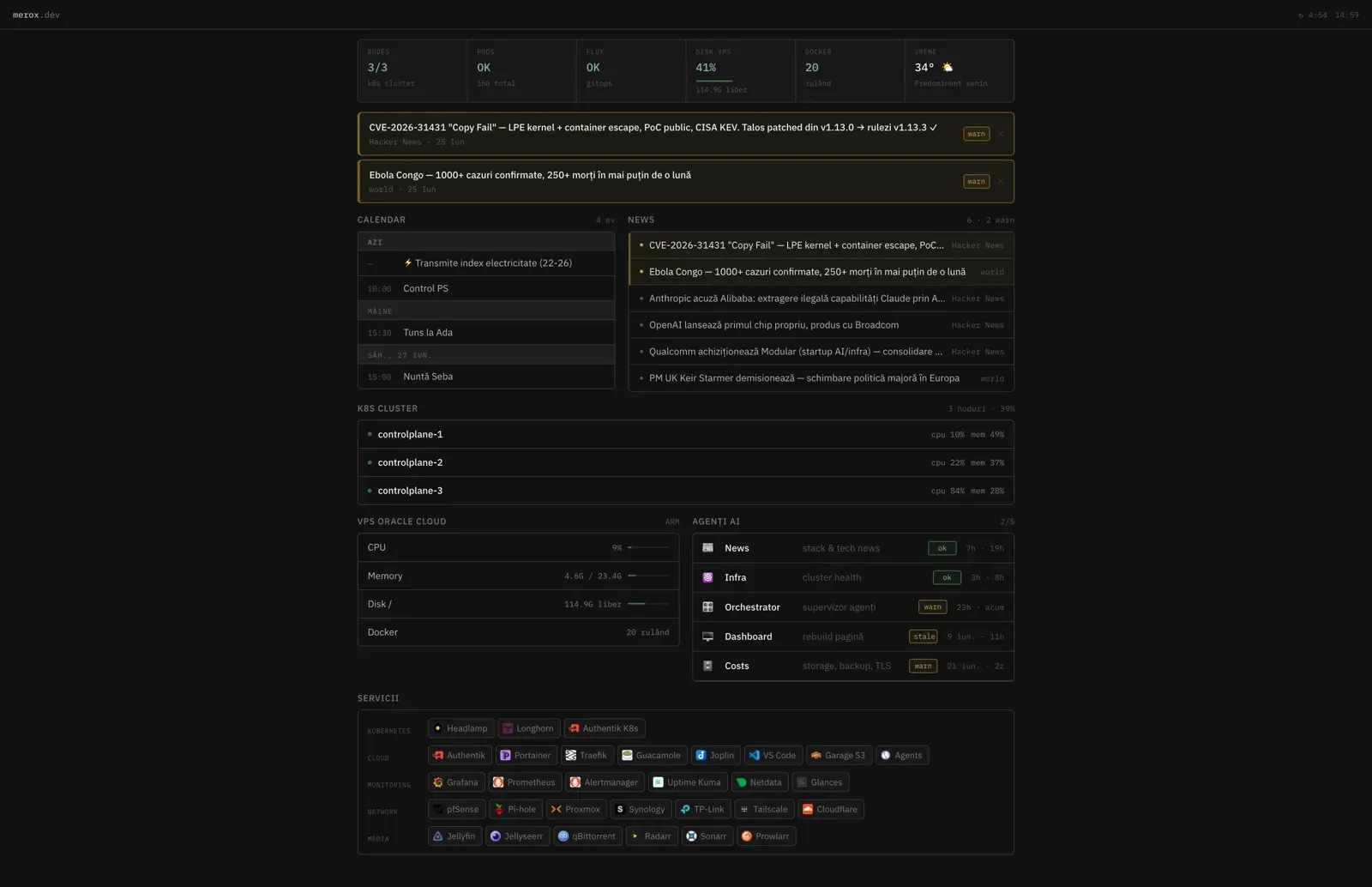
An nginx container handles the serving:
services: agents-dashboard: image: nginx:alpine volumes: - /srv/dashboard:/usr/share/nginx/html:ro networks: network-cloud-merox: ipv4_address: 172.25.10.90 labels: - "traefik.enable=true" - "traefik.http.routers.agents-dashboard.rule=Host(`agents.cloud.merox.dev`)" - "traefik.http.routers.agents-dashboard.entrypoints=https" - "traefik.http.routers.agents-dashboard.tls.certresolver=cloudflare" - "traefik.http.routers.agents-dashboard.middlewares=middlewares-authentik@file,default-headers@file"Protected by Authentik — same SSO as the rest of the homelab stack.
After each run, an agent updates its status in agents.json:
import jsonwith open('/srv/dashboard/data/agents.json') as f: data = json.load(f)data['infra'] = { 'lastRun': '2026-05-28T08:00:00Z', 'status': 'ok', # ok / warn / error 'summary': 'All nodes healthy. Disk at 45%.'}with open('/srv/dashboard/data/agents.json', 'w') as f: json.dump(data, f, indent=2)OpenClaw config
All agents in one openclaw.json:
{ gateway: { mode: "local", port: 18789, bind: "tailnet", auth: { mode: "token", token: "GENERATED_BY_ONBOARD_DO_NOT_SET_MANUALLY" } }, agents: { defaults: { model: { primary: "anthropic/claude-sonnet-4-6", fallbacks: ["anthropic/claude-opus-4-7", "anthropic/claude-opus-4-6", "google/gemini-2.5-flash"] }, thinkingDefault: "low", timeoutSeconds: 1800, heartbeat: { every: "0m" }, // heartbeats via cron, not gateway polling skipBootstrap: true, contextPruning: { mode: "cache-ttl", ttl: "5m" }, agentRuntime: { id: "claude-cli" } },25 collapsed lines
list: [ { id: "news", default: true, workspace: "/home/openclaw/.openclaw/workspace" }, { id: "infra", workspace: "/home/openclaw/.openclaw/workspace-infra" }, { id: "costs", workspace: "/home/openclaw/.openclaw/workspace-costs" }, { id: "dashboard", workspace: "/home/openclaw/.openclaw/workspace-dashboard" }, { id: "orchestrator", workspace: "/home/openclaw/.openclaw/workspace-orchestrator" } ] }, channels: { telegram: { botToken: "YOUR_TELEGRAM_BOT_TOKEN", allowFrom: ["YOUR_TELEGRAM_USER_ID"], dmPolicy: "allowlist" } }, session: { scope: "per-sender", reset: { mode: "daily", atHour: 4, idleMinutes: 10080 } }, tools: { profile: "coding", fs: { workspaceOnly: false }, agentToAgent: { enabled: true } }}OpenClaw uses Claude Code CLI’s OAuth — no separate Anthropic API key needed if you have Claude Pro. All messages go to the default agent (news), which routes to the others via agentToAgent when needed.
Setup
Full install in 15 minutes from scratch:
1 — Install OpenClaw
curl -fsSL https://deb.nodesource.com/setup_24.x | sudo -E bash -sudo apt install -y nodejssudo npm install -g openclaw@latestopenclaw --version2 — Create the service user
sudo useradd -m -s /bin/bash -d /home/openclaw -c "OpenClaw Service" openclawsudo usermod -aG docker openclawsudo loginctl enable-linger openclaw
# Copy sudoers from infra reposudo cp /srv/kubernetes/infrastructure/agent/scripts/sudoers-openclaw /etc/sudoers.d/openclawsudo chmod 440 /etc/sudoers.d/openclaw
3 — Kubeconfig and talosconfig
sudo -u openclaw mkdir -p /home/openclaw/.kube /home/openclaw/.talossudo cp /srv/kubernetes/infrastructure/kubeconfig /home/openclaw/.kube/configsudo cp /srv/kubernetes/infrastructure/talos/clusterconfig/talosconfig /home/openclaw/.talos/configsudo chown openclaw:openclaw /home/openclaw/.kube/config /home/openclaw/.talos/configsudo chmod 600 /home/openclaw/.kube/config /home/openclaw/.talos/config4 — Configure and install the workspaces
sudo -u openclaw mkdir -p /home/openclaw/.openclaw
# Copy config (fill in Telegram token + your user ID)sudo cp /srv/kubernetes/infrastructure/agent/openclaw.json.example \        /home/openclaw/.openclaw/openclaw.jsonsudo chown openclaw:openclaw /home/openclaw/.openclaw/openclaw.jsonsudo chmod 600 /home/openclaw/.openclaw/openclaw.json
# Install workspacesAGENT_DIR=/srv/kubernetes/infrastructure/agent/workspacesfor agent in news infra costs dashboard orchestrator; do  sudo -u openclaw cp -r $AGENT_DIR/$agent \    /home/openclaw/.openclaw/workspace$([ "$agent" = "news" ] && echo "" || echo "-$agent")donesudo -u openclaw mkdir -p /home/openclaw/.openclaw/workspace/memory
5 — Authenticate Claude Code, then OpenClaw
# 1. Log in to Claude Pro via OAuth (opens browser link)sudo -u openclaw claude login
# 2. Run OpenClaw onboard to wire up Claude CLI auth and generate the gateway token#    This adds agentRuntime: { id: "claude-cli" } to openclaw.json — no API key neededsudo -u openclaw XDG_RUNTIME_DIR=/run/user/$(id -u openclaw) \  openclaw onboard --non-interactive \  --mode local \  --auth-choice anthropic-cli \  --skip-bootstrap \  --skip-skills \  --skip-daemon \  --accept-risk
This uses your Claude Pro subscription — no per-token billing, no separate API key. The onboard command generates gateway.auth.token and adds agentRuntime: { id: "claude-cli" } for all Claude models. After this, re-add your Telegram credentials to ~/.openclaw/openclaw.json if onboard overwrote them.
6 — The dashboard
sudo mkdir -p /srv/dashboard/datasudo chown openclaw:openclaw /srv/dashboard /srv/dashboard/data
# Copy operational scripts (cron jobs that collect metrics without AI tokens)sudo cp /srv/kubernetes/infrastructure/agent/dashboard/scripts/*.sh /srv/dashboard/sudo chmod 755 /srv/dashboard/*.shsudo chmod 750 /srv/dashboard/tg-notify.sh  # restricted: openclaw-onlysudo chown openclaw:openclaw /srv/dashboard/*.sh
# Create /srv/dashboard/.env from the template and fill in secrets:# TELEGRAM_BOT_TOKEN, TELEGRAM_CHAT_ID, GARAGE_TOKEN, GARAGE_BUCKET_ID,# APPLE_ID, APPLE_APP_PASSWORDsudo cp /srv/kubernetes/infrastructure/agent/dashboard/.env.example /srv/dashboard/.envsudo chmod 600 /srv/dashboard/.env && sudo chown openclaw:openclaw /srv/dashboard/.envsudo -u openclaw nano /srv/dashboard/.env
# Install Python dep for iCloud calendar (caldav)sudo bash /srv/dashboard/setup-deps.sh
cd /srv/docker/agents-dashboard && docker compose up -d
7 — fix-perms and the crontab
# Copy fix-perms script from infra reposudo cp /srv/kubernetes/infrastructure/agent/scripts/openclaw-fix-perms /usr/local/bin/sudo chmod 755 /usr/local/bin/openclaw-fix-permssudo cp /srv/kubernetes/infrastructure/agent/scripts/sudoers-fix-perms \        /etc/sudoers.d/openclaw-fix-permssudo chmod 440 /etc/sudoers.d/openclaw-fix-perms
# Add to root crontab(crontab -l 2>/dev/null; echo "*/5 * * * * /usr/local/bin/openclaw-fix-perms") | crontab -
# Install talosctl system-wide (mise installs it in root's home, not accessible by openclaw)sudo cp ~/.local/share/mise/installs/aqua-siderolabs-talos/TALOS_VERSION/talosctl /usr/local/bin/sudo chmod 755 /usr/local/bin/talosctl
# Install openclaw user crontabsudo -u openclaw crontab /srv/kubernetes/infrastructure/agent/scripts/openclaw-crontab
8 — Start the gateway
sudo -u openclaw mkdir -p /home/openclaw/.config/systemd/usersudo cp /srv/kubernetes/infrastructure/agent/scripts/openclaw-gateway.service \        /home/openclaw/.config/systemd/user/sudo chown openclaw:openclaw /home/openclaw/.config/systemd/user/openclaw-gateway.service
XDG_RUNTIME_DIR=/run/user/$(id -u openclaw) \  sudo -u openclaw systemctl --user daemon-reload
XDG_RUNTIME_DIR=/run/user/$(id -u openclaw) \  sudo -u openclaw systemctl --user enable --now openclaw-gateway.service
Verify:
XDG_RUNTIME_DIR=/run/user/$(id -u openclaw) \ sudo -u openclaw systemctl --user status openclaw-gatewaysudo -u openclaw openclaw doctorProactive agents
Five agents run without being asked:
infra at 08:00 and 20:00 UTC — checks cluster nodes, unhealthy pods, disk space, stopped containers. Sends Telegram only if something is wrong. If you stop getting messages, either everything is fine or the agent itself died (check the service).
news at 04:00 UTC — reads pre-fetched GitHub release data, then searches Hacker News, Reddit r/homelab and r/selfhosted, and does targeted web searches for CVEs and AI/infra news. CVEs are filtered to what’s actually installed on the K8s cluster and Oracle VPS — no generic “this library is used somewhere” noise. Writes the structured JSON for the dashboard, the HTML briefing page, then sends a Telegram summary in Romanian.
costs on Sunday at 09:00 UTC — verifies backups: Garage S3 object counts, Longhorn snapshot status, NAS accessibility. Writes backup.json for the dashboard and sends a summary on Telegram if anything is stale or missing.
dashboard at 23:00 UTC — audits the command center dashboard nightly: validates JSON data files, checks that all JavaScript references have matching HTML elements, then makes one incremental improvement if the audit passes. Self-tests after each change.
orchestrator at 12:00 UTC — audits all other agents: checks they ran on schedule, rotates oversized logs, validates data files. If it finds a pattern worth fixing in an agent’s logic, it sends a Telegram proposal with a concrete description. You approve or reject with /da or /nu. Applied changes are backed up automatically with rollback detection.
The orchestrator can also propose infrastructure-level changes — crontab schedule adjustments, new workspace files, openclaw.json agent additions — all requiring explicit approval before any change is applied. It never modifies security-sensitive config (auth tokens, allowlists, sudoers).
Heartbeats are configured via cron jobs on the openclaw user, not via OpenClaw’s built-in heartbeat polling (which burns tokens every 30 minutes even when there’s nothing to do):
# As openclaw user: crontab -e
# AI agents — proactive (cron-triggered)0 4  * * *  /srv/dashboard/news-morning-run.sh           # wrapper: fresh session + MORNING_RUN0 8  * * *  /usr/bin/openclaw agent --agent infra        --message "HEARTBEAT"0 20 * * *  /usr/bin/openclaw agent --agent infra        --message "HEARTBEAT"0 9  * * 0  /usr/bin/openclaw agent --agent costs        --message "HEARTBEAT"0 23 * * *  /usr/bin/openclaw agent --agent dashboard    --message "HEARTBEAT"0 12 * * *  /usr/bin/openclaw agent --agent orchestrator --message "HEARTBEAT"
# Zero-AI data collection (bash scripts, no tokens)*/5  * * * *  /srv/dashboard/update-infra.sh       # K8s nodes/pods/docker/longhorn*/30 * * * *  /srv/dashboard/update-backup.sh      # NAS/Garage S3/Longhorn backup status*/30 * * * *  /srv/dashboard/update-weather.sh     # Open-Meteo hyperlocal weather (no API key)0    * * * *  /srv/dashboard/update-network.sh     # Subnet scan — homelab LAN + WiFi + Tailscale0  */6 * * *  /srv/dashboard/update-news.sh        # GitHub releases → news-releases.json*/30 * * * *  /srv/dashboard/update-upgrades.sh    # Renovate PRs from infrastructure repo*/30 * * * *  /srv/dashboard/update-calendar.sh    # iCloud CalDAV events (app-specific password)
# Watchdogs + utilities5 8,20 * * *  /srv/dashboard/self-healing.sh       # restart stale agents after infra runs0 */2  * * *  /srv/dashboard/check-logs.sh         # scan agent logs for errors15 12  * * *  /srv/dashboard/check-proposals.sh    # notify pending orchestrator proposals*  *   * * *  /srv/dashboard/process-triggers.sh   # pick up manual run-triggers from dashboard UI
# Calendar + utility reminders0 4    * * *  /srv/dashboard/calendar-reminder.sh  # daily events summary via Telegram5 7   22 * *  /srv/dashboard/tg-notify.sh "⚡ Reminder: transmite indexul de electricitate"5 7    5 * *  /srv/dashboard/tg-notify.sh "🔥 Reminder: transmite indexul de gaz"
Orchestrator proposals
The orchestrator introduces an approval loop for agent improvements. When it detects a pattern worth fixing — say, the news agent has been alerting on releases that Renovate would handle anyway, three weeks in a row — it writes a proposal to /srv/dashboard/data/proposals.json and sends a Telegram message:
🔧 Propunere #prop-20260529-news-001
Agent: newsRisc: low
Skip Renovate-covered releases in news alertsNews agent has alerted on 4 simple version bumps this week that Renovatewould have caught on Saturday. Add a filter for releases where no CVEor breaking change is present.
Răspunde cu /da prop-20260529-news-001 sau /nu prop-20260529-news-001Reply /da and the next orchestrator run patches the relevant section of that agent’s AGENTS.md, backs up the original, and confirms on Telegram. If the change causes a regression (detected by comparing agents.json status before/after), it auto-rolls back and alerts.
Safe fixes — log rotation, missing JSON keys, stale file cleanup — happen automatically without asking.
Disaster recovery
Everything except secrets and memory is in the infra repo at agent/. Rebuilding on a new server in ~15 minutes:
- Install Node.js 24 + OpenClaw (
npm install -g openclaw@latest) - Create
openclawuser + docker group + linger - Copy
sudoers-openclaw→/etc/sudoers.d/openclaw - Copy kubeconfig + talosconfig to
/home/openclaw/.kube/and/home/openclaw/.talos/ - Install talosctl to
/usr/local/bin/(mise installs it per-user, not system-wide) - Copy all 5 workspaces from
agent/workspaces/— creatememory/dirs for all - Copy
openclaw.json.example→~/.openclaw/openclaw.json, fill in Telegram token sudo -u openclaw claude login(OAuth — opens browser)sudo -u openclaw openclaw onboard --auth-choice anthropic-cli --skip-bootstrap- Install
openclaw-fix-permsto/usr/local/bin/+ root crontab*/5 * * * * - Install
openclaw-crontabas openclaw user’s crontab - Copy
agent/dashboard/scripts/*.sh→/srv/dashboard/, create/srv/dashboard/.envfrom template - Start systemd user service +
docker compose up -dfor dashboard
Can’t be auto-recovered:
openclaw.jsonsecrets (Telegram token + gateway auth token) — keep in a password manager/srv/dashboard/.env(Telegram + Garage S3 + Apple credentials) — keep in a password managerworkspace*/memory/files — agents rebuild context over a few days, history is lost
What the agents can’t do without attention on first boot:
infra-extended.jsonwon’t exist until the infra agent runs (08:00 UTC)proposals.jsonneeds to be initialized:echo '{"pending":[],"history":[]}' > /srv/dashboard/data/proposals.json
Everything else is in git or regenerates automatically.
The design decision worth stealing from this, if you take nothing else: the agents only speak when something is wrong, and everything that can be collected by a bash script is collected by a bash script. Built-in heartbeat polling burns tokens every thirty minutes to discover that nothing happened. Cron does the same job for free, and an agent that messages you daily regardless is one you stop reading by the second week.
Config template, workspace files, sudoers and systemd unit: github.com/meroxdotdev/infrastructure/agent/