I wanted to add a “Recently Played” section to my website that automatically updates with my latest music. Instead of manually updating it every day, I built an automated system that fetches data from Last.fm and rebuilds my site daily using GitHub Actions.
Here’s what I’ll cover:
- Setting up Last.fm API integration
- Building the Tunes page with Astro
- Configuring environment variables in Cloudflare Pages
- Automating daily updates with GitHub Actions
- Using Web Scrobbler for YouTube on iOS/Mac
Why Last.fm?
Last.fm is perfect for this because it tracks everything you listen to across different platforms—Spotify, Apple Music, YouTube, and more. Once you connect your accounts, it automatically scrobbles (records) your listening history.
Tip
What is Scrobbling? Scrobbling is Last.fm’s term for automatically recording the music you listen to. Once set up, it works in the background without any manual input.
Getting Your Last.fm API Key
First, you’ll need a Last.fm API key:
- Go to Last.fm API Account
- Fill in the application details (name, description, callback URL)
- Copy your API Key and Shared Secret
Note
The callback URL can be any valid URL—I used https://merox.dev for mine. It’s mainly used for authentication flows, which we won’t need for basic API access.
Building the Tunes Page
I’m using Astro for my site, so I created a page that fetches Last.fm data at build time. Here’s the core implementation:
Creating the Last.fm Library
First, I created a utility library to handle Last.fm API requests in src/lib/lastfm.ts:
const LASTFM_API_BASE = 'https://ws.audioscrobbler.com/2.0/'const REQUEST_TIMEOUT_MS = 8000
async function lastFmRequest(params: Record<string, string>): Promise<any> { const apiKey = import.meta.env.PUBLIC_LASTFM_API_KEY if (!apiKey) { return null }
try { const searchParams = new URLSearchParams({ api_key: apiKey, format: 'json', ...params, })
const url = `${LASTFM_API_BASE}?${searchParams.toString()}` const controller = new AbortController() const timeoutId = setTimeout(() => controller.abort(), REQUEST_TIMEOUT_MS)
const response = await fetch(url, { headers: { 'User-Agent': 'merox.dev/1.0', }, signal: controller.signal, })
clearTimeout(timeoutId)
if (!response.ok) { return null }
const data = await response.json()
if (data.error) { return null }
return data } catch (error) { return null }}
export async function fetchRecentTracks( username?: string, limit: number = 10,): Promise<LastFmTrack[]> { const user = username || import.meta.env.PUBLIC_LASTFM_USERNAME if (!user) { return [] }
const data = await lastFmRequest({ method: 'user.getrecenttracks', user, limit: Math.min(limit, 200).toString(), })
if (!data?.recenttracks?.track) { return [] }
const tracks = Array.isArray(data.recenttracks.track) ? data.recenttracks.track : [data.recenttracks.track]
// Include tracks that have a date (played) OR are currently playing return tracks.filter((track: any) => track.date || track['@attr']?.nowplaying === 'true')}The Tunes Page Component
The page fetches data at build time and displays it in a clean, retro-style interface. Here’s the implementation in src/pages/tunes.astro:
---import { fetchRecentTracks, fetchUserInfo } from '@/lib/lastfm'
let recentTracks: LastFmTrack[] = []let userInfo = nulllet hasLastFm = false
try { const username = import.meta.env.PUBLIC_LASTFM_USERNAME const apiKey = import.meta.env.PUBLIC_LASTFM_API_KEY
if (username && apiKey) { hasLastFm = true const [tracksResult, userInfoResult] = await Promise.allSettled([ fetchRecentTracks(username, 10), fetchUserInfo(username), ])
recentTracks = tracksResult.status === 'fulfilled' ? tracksResult.value : [] userInfo = userInfoResult.status === 'fulfilled' && userInfoResult.value ? userInfoResult.value : null }} catch (error) { // Silently fail in production}---
<Layout class="max-w-4xl"> <PageHead slot="head" title="Tunes" />
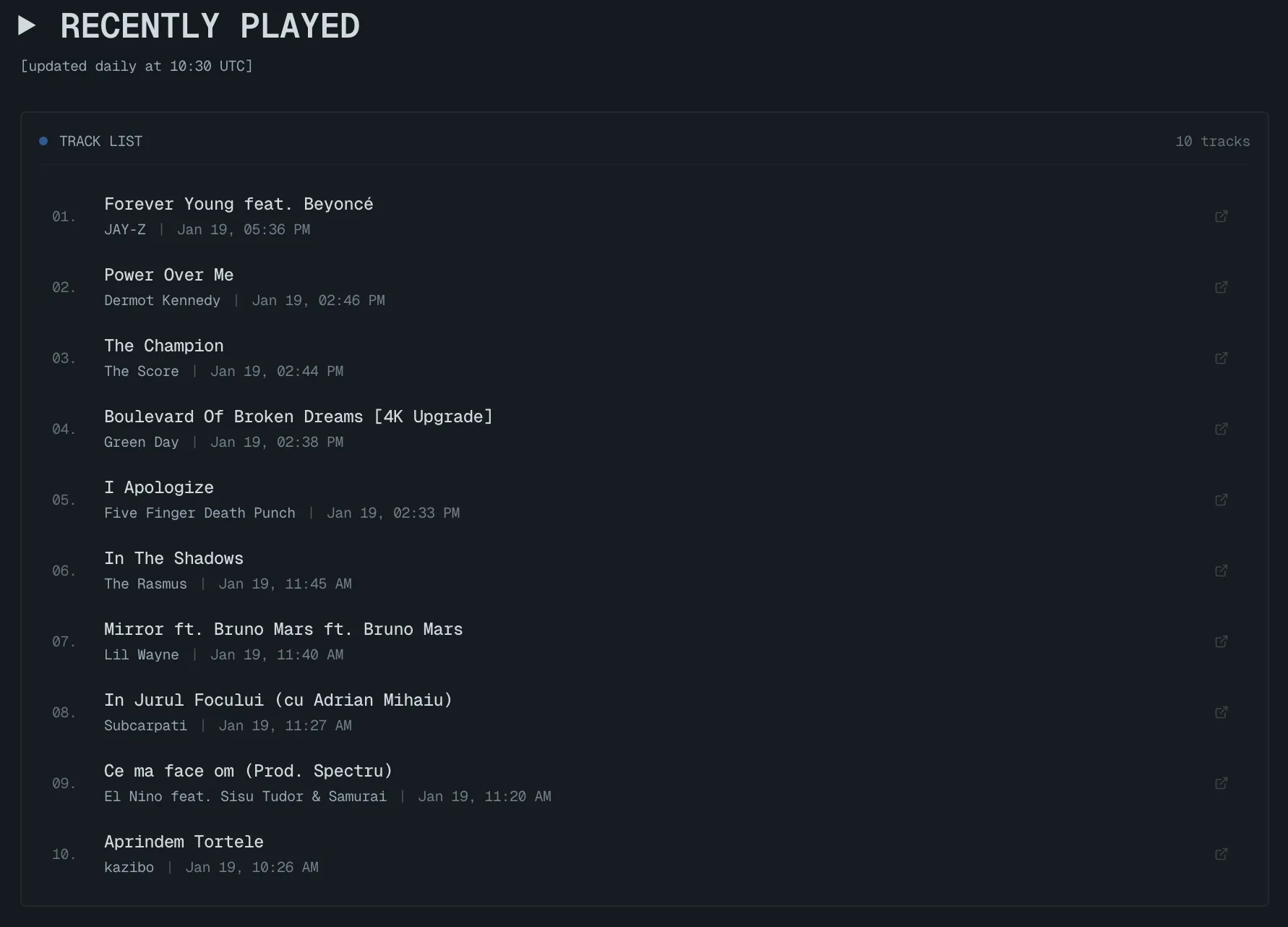
<section> <h1>▶ recently played</h1> {hasLastFm && ( <p>[updated daily at 20:00 Romania time]</p> )}
{recentTracks.map((track, index) => ( <div key={index}> <a href={track.url} target="_blank" rel="noopener"> <span>{track.name}</span> <span>{track.artist['#text']}</span> {track.date && ( <time>{formatLastFmDate(track.date.uts)}</time> )} </a> </div> ))} </section></Layout>Here’s how the final Tunes page looks on my site:
Configuring Environment Variables in Cloudflare Pages
Since I’m hosting on Cloudflare Pages, I need to set environment variables:
- Go to your Cloudflare Pages project
- Navigate to Settings → Environment Variables
- Add these variables:
PUBLIC_LASTFM_USERNAME- Your Last.fm usernamePUBLIC_LASTFM_API_KEY- Your Last.fm API key
Here’s how the environment variables look in my Cloudflare Pages dashboard:

Tip
Why PUBLIC_ prefix? In Astro (and Vite), environment variables prefixed with PUBLIC_ are exposed to the client-side code. Since we’re fetching at build time, this is safe and necessary.
These variables are only accessible during the build process and won’t be exposed in your client-side JavaScript.
Automating Daily Updates with GitHub Actions
The key is getting Cloudflare to rebuild your site daily so it fetches fresh data from Last.fm. The simplest approach is to create a small commit that Cloudflare detects and triggers a rebuild automatically.
Here’s my .github/workflows/update-music.yml:
name: Daily Site Rebuild
on: schedule: - cron: '0 18 * * *' # 18:00 UTC daily workflow_dispatch:
permissions: contents: write
jobs: trigger-build: runs-on: ubuntu-latest steps: - uses: actions/checkout@v4 with: token: ${{ secrets.GITHUB_TOKEN }}
- name: Trigger rebuild run: | date -u +"%Y-%m-%dT%H:%M:%SZ" > .last-build-trigger git config user.name "github-actions[bot]" git config user.email "github-actions[bot]@users.noreply.github.com" git add .last-build-trigger git commit -m "chore: daily rebuild trigger" git pushHow It Works
- Schedule: Runs daily at 18:00 UTC (20:00 Romania time in winter, 21:00 in summer)
- Checkout: Clones the repository using the built-in
GITHUB_TOKEN - Trigger file: Writes the current UTC timestamp to
.last-build-trigger - Commit & Push: Commits the change and pushes to main branch
- Cloudflare detects: The push triggers Cloudflare to rebuild the site
Tip
Why a trigger file? This is the simplest approach—no API tokens needed. The .last-build-trigger file creates a real commit that Cloudflare reliably detects. The GITHUB_TOKEN is automatically provided by GitHub Actions, so there’s zero configuration required.
Setting Up the Workflow
The beauty of this approach is that it requires no secrets configuration:
GITHUB_TOKENis automatically provided by GitHub Actions- Cloudflare is already connected to your repository (via the Pages integration)
- Just add the workflow file and you’re done!
Note
Manual trigger: The workflow_dispatch option lets you trigger the workflow manually from GitHub’s Actions tab. Useful for testing or forcing an immediate update.
Setting Up Web Scrobbler for YouTube
I listen to a lot of music on YouTube, especially on iOS and Mac. To track those plays, I use Web Scrobbler, a browser extension that scrobbles music from various websites.
For Desktop (Chrome/Edge/Firefox)
- Install Web Scrobbler extension
- Connect your Last.fm account in the extension settings
- Enable scrobbling for YouTube
- That’s it—it works automatically!
For iOS/Mac Safari
Safari doesn’t support extensions the same way, but here’s what I do:
Option 1: Use a different browser
- Install Chrome or Firefox on your Mac
- Use Web Scrobbler extension there
- Most YouTube listening happens on desktop anyway
Option 2: Manual scrobbling (for important tracks)
- Use the Last.fm mobile app to manually scrobble
- Or use Open Scrobbler for quick manual entries
Option 3: Use MusicBrainz Picard (for downloaded music)
- If you download music, Picard can scrobble automatically
- Works great for local music libraries
Tip
Pro Tip: If you’re primarily on iOS, consider using Apple Music or Spotify with Last.fm integration. Both platforms have built-in Last.fm scrobbling that works seamlessly on mobile devices.
How It All Works Together
Here’s the complete flow:
- You listen to music → Last.fm tracks it (via Spotify, Apple Music, Web Scrobbler, etc.)
- GitHub Actions runs daily at 18:00 UTC → Updates
.last-build-triggerwith current timestamp - Commit pushed to main → Cloudflare detects the new commit
- Cloudflare rebuilds → Astro fetches fresh data from Last.fm API during build
- Site updates → Your Tunes page shows the latest tracks
The whole process is fully automated with zero maintenance. No API tokens to manage, no secrets to rotate—just a simple Git commit that keeps your music page fresh.
Troubleshooting
Tracks Not Updating
- Check that your Last.fm account is actually receiving scrobbles
- Verify environment variables are set correctly in Cloudflare Pages
- Check GitHub Actions logs to see if the workflow ran successfully
- Verify the
.last-build-triggerfile is being updated (check recent commits)
GitHub Actions Workflow Failing
- Ensure the workflow has
permissions: contents: writeto push commits
Warning
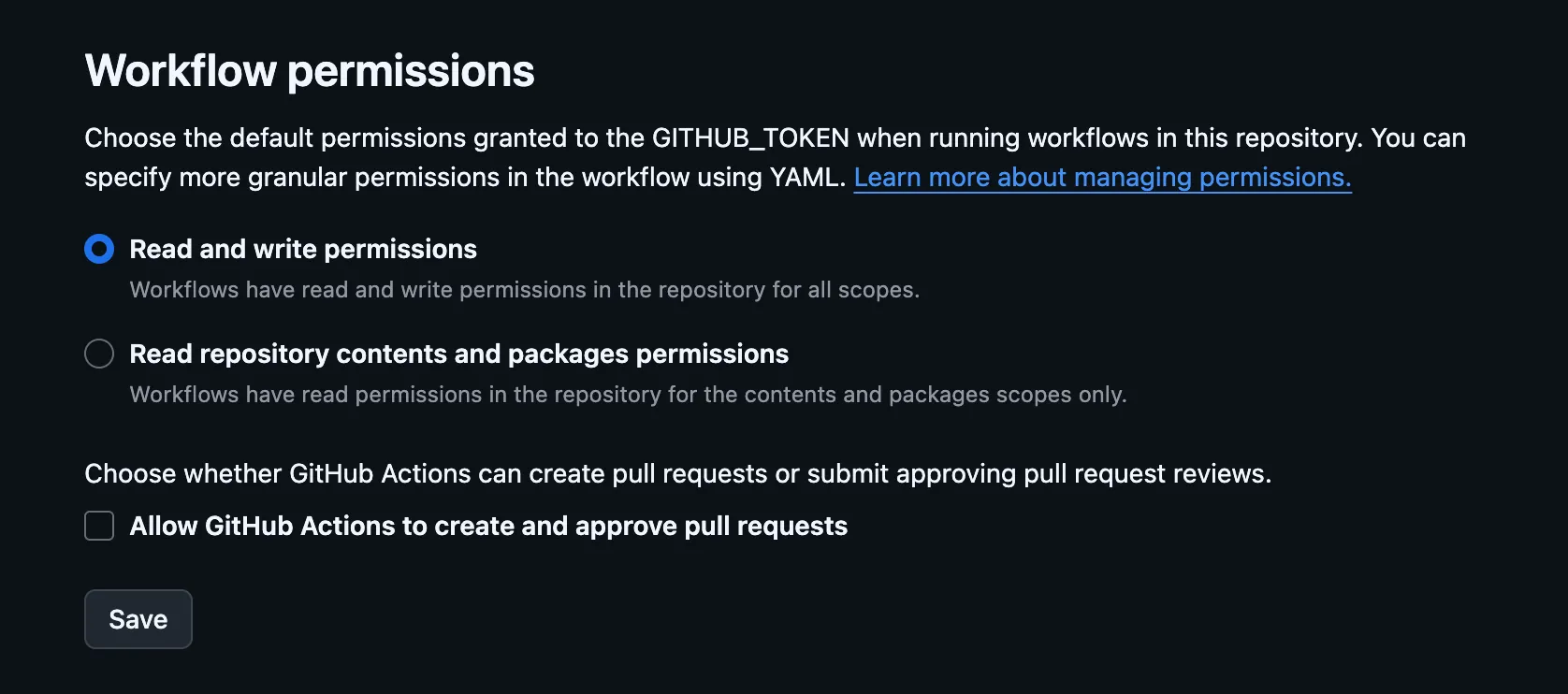
Important: Enable Write Permissions
For the workflow to successfully push the trigger commit, you must grant write access to the GITHUB_TOKEN:
- Go to your GitHub repository Settings.
- Navigate to Actions > General.
- Scroll down to Workflow permissions.
- Select Read and write permissions and click Save.
- Check if branch protection rules are blocking the push
- Verify the repository is connected to Cloudflare Pages
Build Failing
- Ensure your Last.fm API key is valid
- Check that
PUBLIC_LASTFM_USERNAMEmatches your actual Last.fm username - Review Cloudflare Pages build logs for specific errors
Web Scrobbler Not Working
- Make sure the extension is enabled for the website
- Check that you’re logged into Last.fm in the extension
- Try refreshing the page after enabling scrobbling
Final Thoughts
This setup has been running smoothly for months. The page updates automatically every day, and I never have to think about it. It’s a great example of how automation can make your website more dynamic without adding maintenance overhead.
If you’re interested in seeing it in action, check out my Tunes page. The code is also available in my GitHub repository if you want to see the full implementation.
Tip
Want to customize it? The Last.fm API supports many other endpoints—top artists, top albums, listening stats, and more. You can easily extend this setup to show additional music data on your site.