merox-erudite: A Customized Astro Theme
A fork of astro-erudite v1 with comments, analytics, SEO schemas, and an enhanced homepage — built for production blogging.
I started this blog on astro-erudite — a clean, minimal template. Over several months I kept adding things: comments, analytics, schema markup, a homepage that actually said something about me. At some point the diff was large enough that keeping it as silent local patches didn’t make sense anymore, so I published it as a fork: merox-erudite.
Most of this was built with Claude Code and Cursor. I gave it well-defined prompts, reviewed everything, kept pushing until it was clean with no workarounds. I’m a sysadmin, not a web developer — this was a genuine experiment in how far you can get with AI tooling when you know what you want but don’t know the framework well.
meroxdotdev/merox-eruditeon GitHub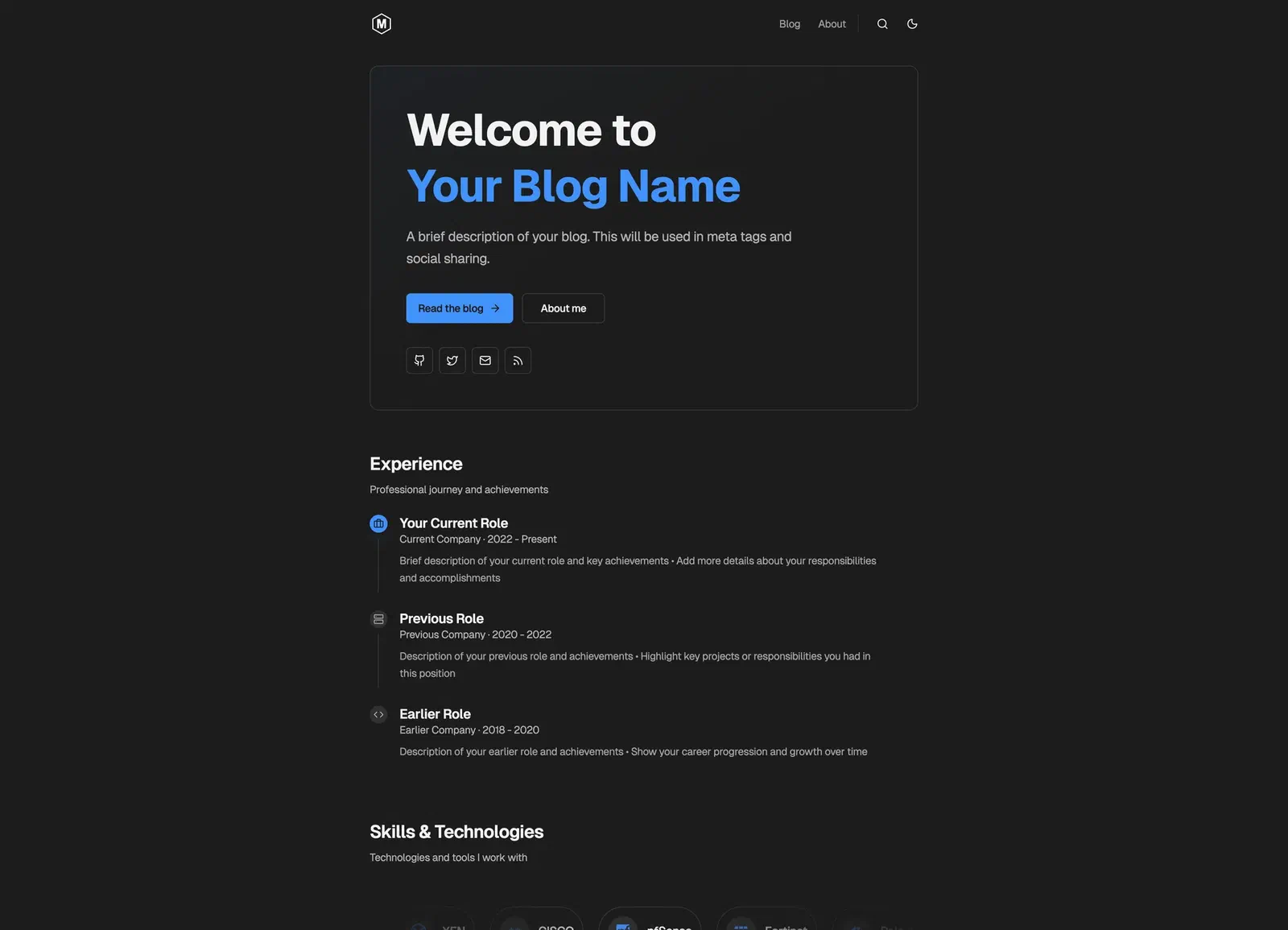
The reason for a fork rather than contributing back: some features (AdSense) don’t fit the original theme’s minimal philosophy, and the scope of changes is too personal to be a reasonable upstream PR. astro-erudite stays minimal; merox-erudite is batteries-included.
What I added
Giscus comments — GitHub Discussions, lazy-loaded, surviving Astro view transitions, following the theme. Unconfigured, the component doesn’t render at all. Needs a public repo with Discussions enabled.
Analytics — Google Analytics and Umami, both off unless the env vars exist:
PUBLIC_GOOGLE_ANALYTICS_ID=G-XXXXXXXXXX
PUBLIC_UMAMI_WEBSITE_ID=your-umami-id
SEO schemas — reusable FAQ and HowTo components for structured data.
Homepage — experience timeline, skills badges, a hero that says something. The timeline is data, configured in src/pages/index.astro:
const experience: ExperienceItem[] = [
  {
    role: 'Your Role',
    company: 'Company Name',
    period: '2020 - Present',
    current: true,
    icon: 'lucide:briefcase',
    key: 'Your achievements and responsibilities'
  },
]
Design — Geist variable fonts, better contrast in dark mode, visible focus rings for keyboard navigation.
Against the original
| Feature | astro-erudite v1 | merox-erudite |
|---|---|---|
| Comments | — | Giscus (GitHub Discussions) |
| Analytics | — | Google Analytics and Umami |
| SEO schemas | Basic | FAQ and HowTo |
| Homepage | Standard | Experience timeline, skills |
| Fonts | System | Geist variable fonts |
| AdSense | — | Built-in component |
Getting started
- Click “Use this template” on the merox-erudite repository
- Clone and install:
git clone https://github.com/YOUR_USERNAME/YOUR_REPO_NAME.git cd YOUR_REPO_NAME npm install - Start dev server:Available at
npm run devhttp://localhost:1234 - Update
src/consts.tswith your site info - Configure optional features via environment variables
For the original theme’s architecture and design documentation, see the astro-erudite repository by @jktrn.
Deploying it
I deployed it on Cloudflare Pages: free tier, global CDN, deploys on push, and environment variables you can edit without a CLI.
Astro is auto-detected, but if it isn’t:
- Build command:
npm run build - Output directory:
dist - Node version: 20.x+
Environment variables go in Cloudflare Dashboard → Settings → Environment Variables. They’re read at build time, so a change here needs a redeploy to take effect:
PUBLIC_GOOGLE_ANALYTICS_ID=G-XXXXXXXXXX
PUBLIC_UMAMI_WEBSITE_ID=your-umami-id

PUBLIC_GISCUS_REPO=username/repo
PUBLIC_GISCUS_REPO_ID=your-repo-id
PUBLIC_GISCUS_CATEGORY=Blog Comments
PUBLIC_GISCUS_CATEGORY_ID=your-category-idWhat I’d tell anyone considering the same fork: the moment your changes stop being patches and start being a philosophy the upstream doesn’t share, fork it. AdSense was never going to land in a theme whose whole point is minimalism, and pretending otherwise just meant carrying an unmergeable diff in silence.
References
- astro-erudite by @jktrn — original design and architecture
- Astro Micro by trevortylerlee — inspiration
- Cursor — development tool