Setting Up Dell R720 Server in the Home Lab
Adding a Dell PowerEdge R720 to my homelab: fan control with IPMItool, firmware updates, a Proxmox migration over NFS, RAID storage and UPS integration.
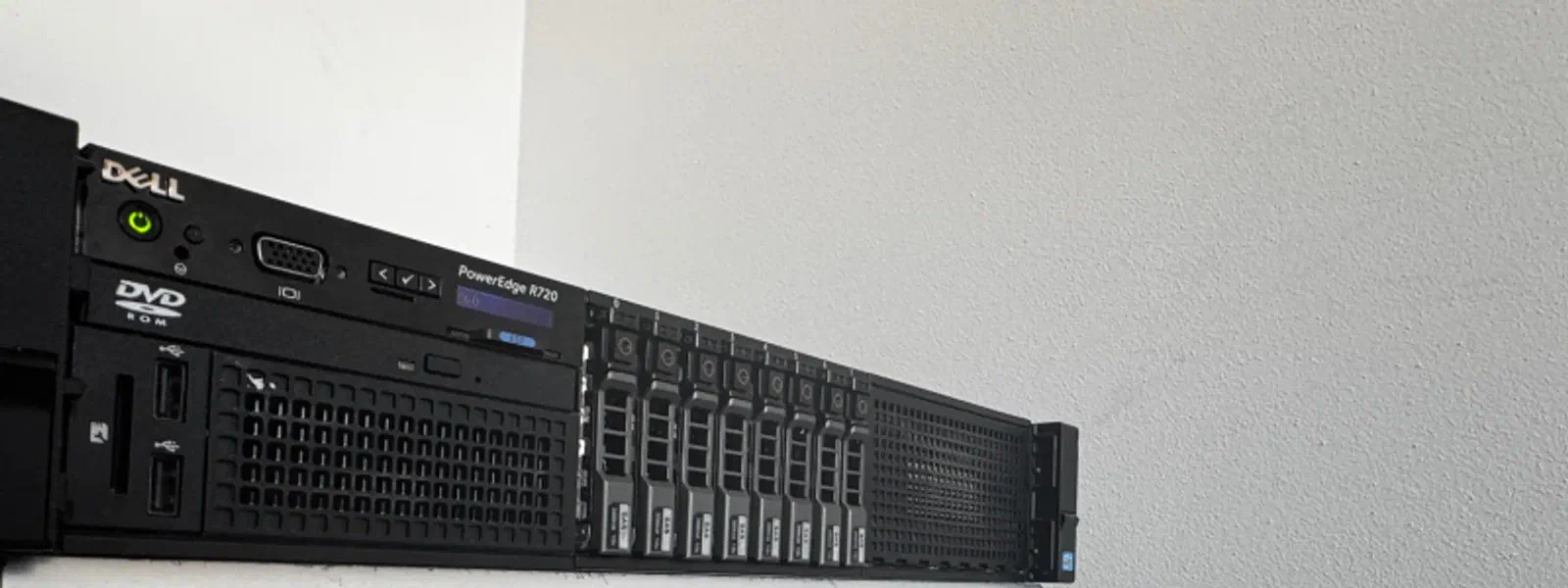
About two years ago I came across a Dell PowerEdge R720 at a price that was hard to ignore — 192GB ECC RAM and dual Xeon E5-2697v2 for what a single mid-range workstation costs new. The idea was to have a proper machine for heavier workloads and experiments in the homelab, and it’s been doing exactly that since. Getting it running wasn’t complicated, but there were a few things worth documenting — fan noise control via iDRAC, firmware updates, migrating Proxmox over NFS, and wiring up the UPS.
Specs
- Form factor: 2U rack
- RAM: 192GB ECC DDR3
- CPUs: Dual Intel Xeon E5-2697v2
- iDRAC: iDRAC7 Enterprise
- Storage: 2× 2TB SSD (RAID 1) + 6× 300GB SAS 6Gb/s (RAID 10)
- Network: Dual-port integrated Gigabit Ethernet
- PSU: Dual redundant (750W each)
What it draws with this config:
- idle
- 120–150 W
- 192GB RAM, both CPUs, SSDs
- under load
- 200–250 W
- sustained
- peak
- ~300 W
- heavy workloads
It arrived broken
The front backplane was disconnected, because the mini SAS cable that came with it was too short to reach. A 59cm cable (Dell part MJCP4) fixed it. Worth checking before you conclude the backplane is dead — no drives are detected either way, and the two look identical from the OS.
Fan control over IPMI
The R720 is loud out of the box, and the default curve doesn’t care that the room it’s in is not a datacentre. IPMItool takes the fans off automatic over the network, through iDRAC.
sudo apt-get install ipmitool

# Take manual control
ipmitool -I lanplus -H ip_addr -U username -P password raw 0x30 0x30 0x01 0x00

# Hand it back to the firmware
ipmitool -I lanplus -H ip_addr -U username -P password raw 0x30 0x30 0x01 0x01

# Set a fixed speed — last byte is the percentage, in hex
ipmitool -I lanplus -H ip_addr -U username -P password raw 0x30 0x30 0x02 0xff 0x14What the last byte buys you:
| Percent | Hex | RPM |
|---|---|---|
| 10% | 0x0A | ~3,300 RPM |
| 16% | 0x10 | ~3,900 RPM |
| 20% | 0x14 | ~4,000 RPM |
| 25% | 0x19 | ~4,700 RPM |
| 30% | 0x1E | ~5,400 RPM |
| 40% | 0x28 | ~7,300 RPM |
| 50% | 0x32 | ~8,000 RPM |
| 60% | 0x3C | ~9,400 RPM |
| 70% | 0x46 | ~10,800 RPM |
| 80% | 0x50 | ~12,100 RPM |
| 90% | 0x5A | ~13,300 RPM |
| 100% | 0x64 | 15,000 RPM |
And to see what they’re actually doing:
ipmitool sensor | grep -i fanFirmware, without a support contract
Dell retired the FTP repository iDRAC used to update from. Kenneth Finnegan runs a community mirror of it, and iDRAC can still pull from that — you only have to tell it which generation you are. Wikipedia’s PowerEdge list has the mapping: the R720 is gen 12, so g12.
Open the updater
In the iDRAC web interface, Maintenance → System Update.
Point it at the mirror
Select FTP: address
ftp.updateyodell.net, userdell, passwordcalvin, pathg12.Apply
Check for Updates, then apply what it finds.
Moving Proxmox onto it
An NFS share on the Synology DS223 was the whole migration path. Add it to the new host as backup storage, and the vzdump archives already on it become restorable:
pvesm add nfs synology --server <synology_ip> --export /volume1/proxmox --content backuppct restore <vmid> /mnt/pve/synology/dump/vzdump-lxc-<vmid>-<timestamp>.tar.zst --storage local-lvmqmrestore /mnt/pve/synology/dump/vzdump-qemu-<vmid>-<timestamp>.vma.zst <vmid> --storage local-lvmStorage
Two 2TB SSDs in RAID 1 for the OS and primary applications. Six 300GB SAS drives in RAID 10 for data — gives you the read performance of striping with redundancy against single drive failures. Configured through the PERC controller during initial setup.
UPS, on PowerPanel
CyberPower UPS, and I went with PowerPanel rather than NUT — vendor tool, vendor hardware, one less integration to debug.
curl -fL -o powerpanel.deb 'https://www.cyberpower.com/tw/en/File/GetFileSampleByType?fileId=SU-18070001-06&fileType=Download%20Center&fileSubType=FileOriginal'
dpkg -i powerpanel.deb
The quotes matter: unquoted, the shell cuts the URL at the first & and runs the rest as background jobs.
The policy is one line, and the two thresholds are an OR:
pwrstat -lowbatt -runtime 300 -capacity 35 -active on -cmd /etc/pwrstatd-lowbatt.sh -duration 1 -shutdown onThis triggers a graceful shutdown when runtime drops below 300 seconds or battery capacity falls under 35%, with a 1-minute delay before executing. The script at /etc/pwrstatd-lowbatt.sh handles any pre-shutdown tasks you want to run.
References
- Dell & HP Server Manual Fan Control
- Kenneth Finnegan — Update your old ass Dell servers
- NOiSEA — CyberPower PowerPanel on Proxmox Forum